QR codes, or Quick Response codes, are an incredibly versatile tool that can significantly enhance your business operations and marketing efforts. They are a type of barcode that can be scanned using a smartphone, instantly directing the user to a specific digital resource, such as a website, contact information, or product details. With the increasing prevalence of smartphones, QR codes have become a popular way for businesses to connect the physical and digital worlds. This blog will explore five key ways to use QR codes in your business, helping you maximize your potential for growth and customer engagement.
What is a QR Business Card?
A QR business card is a modern twist on the traditional business card. Incorporating a QR code into your business card allows instant access to your digital contact information, portfolio, social media profiles, or even a personalized landing page. This eliminates the need for potential clients or partners to enter your details manually, streamlining the process and making it more likely that your contact information will be saved.
Benefits of QR Business Cards
Instant Digital Connection:
The recipient can instantly save your contact information on their phone, reducing the chances of losing or forgetting your card.
Enhanced Professional Image:
QR business cards present a tech-savvy and modern image, demonstrating that your business is up-to-date with the latest trends.
Increased Engagement:
You can link the QR code to various digital assets, such as your website, portfolio, or LinkedIn profile, encouraging recipients to engage with your brand further.
Sustainability:
QR business cards can help reduce paper waste, as fewer cards must be printed when recipients can easily save their information digitally.
How to Implement QR Codes on Business Cards
Design Your Card:
Incorporate your QR code into your business card design, ensuring it is prominently displayed and easy to scan.
Link to Relevant Information:
Decide what information or resource you want the QR code to link to, whether it's your contact details, website, or social media profiles.

Test the QR Code:
Before printing, ensure the QR code is functional and links to the correct destination.
Distribute and Monitor:
Once your QR business cards are ready, distribute them at networking events, meetings, and other business interactions. Monitor the engagement and adjust the linked content as necessary.
QR Your Print Advertisements
Enhancing Print Advertisements with QR Codes
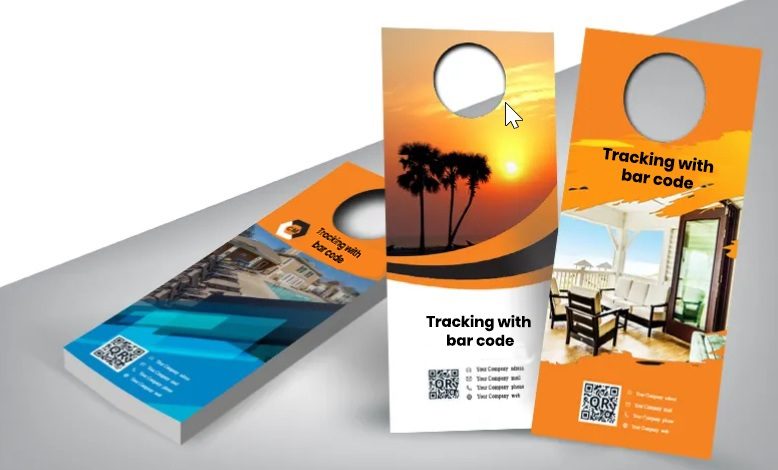
Print advertisements have long been a staple of marketing campaigns, but their static nature can limit them. Adding a QR code to your print advertisements can bridge the gap between offline and online marketing, providing an interactive experience that drives engagement and conversions.
Benefits of QR Codes in Print Advertisements
Trackable Engagement:
QR codes allow you to track how many people interact with your print advertisements, providing valuable data on the effectiveness of your campaign.
Immediate Call to Action:
A QR code can lead users to a landing page, product page, or special offer, encouraging immediate action.
Multimedia Integration:
Print ads are limited in the information they convey, but a QR code can link to videos, product demos, or other rich media content that enhances the message.
Flexibility and Updates:
Unlike print advertisements that are static once printed, QR codes can be updated to direct users to new content or offers without reprinting the ads.
Implementing QR Codes in Print Advertisements
Identify the Goal:
Determine what you want the QR code to achieve, such as driving website traffic, promoting a product, or offering a discount.
Create the QR Code:
Generate a QR code that links to the desired destination, such as a landing page or video.
Design the Ad:
Incorporate the QR code into your advertisement design, ensuring it is large enough to be easily scanned and communicates the benefit of scanning.
Track Performance:
Use QR code analytics to track how many people scan the code and what actions they take afterwards. This data can inform future advertising strategies.
Why Use QR Codes on Business Stationery and Invoices?
Business stationery and invoices are essential tools for communication and branding. Adding QR codes to these materials can enhance their functionality and provide added value to your clients and partners. A QR code can make the process more efficient and interactive, whether sending an invoice, a thank-you note, or a business letter.

Benefits of QR Codes on Stationery and Invoices
Easy Payment Processing:
A QR code on an invoice can link directly to a payment gateway, making it easier for clients to pay their bills promptly.
Enhanced Communication:
QR codes can link to additional resources, such as product manuals, instructional videos, or customer support, providing added value to your clients.
Brand Reinforcement:
Every piece of stationery is an opportunity to reinforce your brand. A QR code can link to a branded landing page, showcasing your business's professionalism and innovation.
Reduced Errors:
By linking to digital forms or contact information, QR codes can reduce the likelihood of errors in data entry or payment processing.
How to Use QR Codes on Business Stationery and Invoices
Identify the Purpose:
Decide what you want the QR code to accomplish, such as facilitating payments, providing additional information, or directing to a feedback form.
Generate the QR Code:
Create a QR code that links to the relevant resource, such as a payment page, customer support, or product information.
Design Your Stationery:
Incorporate the QR code into your stationery or invoice design, ensuring it is easy to scan and clearly labelled with a call to action.
Monitor and Optimize:
Track how clients interact with the QR code and make adjustments to improve its effectiveness.
Using QR Codes to Enhance Event Management
Events, whether conferences, trade shows, or product launches, are prime opportunities for businesses to engage with their audience. QR codes can streamline event management, enhance attendee experience, and provide valuable data for post-event analysis.
Benefits of QR Codes in Event Management
Streamlined Check-In:
QR codes can be used for event registration and check-in, reducing wait times and simplifying the process for attendees.
Interactive Experiences:
QR codes can link to event agendas, speaker bios, or interactive polls, enhancing attendee engagement.
Data Collection:
Use QR codes to gather feedback, collect attendee information, or track session attendance, providing valuable insights for future events.
Promote Post-Event Engagement:
QR codes can direct attendees to post-event resources, such as presentation slides, recordings, or follow-up surveys.
How to Implement QR Codes at Events
Pre-Event Registration:
Include a QR code in your event invitations or marketing materials that link to a registration page.
Event Check-In:
Use QR codes for digital tickets or badges that can be scanned at the event entrance for quick and efficient check-in.
On-Site Engagement:
Place QR codes around the event venue that link to schedules, speaker information, or interactive content.
Post-Event Follow-Up:
Provide attendees with a QR code that links to post-event materials, such as recordings, slides, or feedback forms.
Simplifying Inventory Management with QR Codes
Managing inventory can be complex and time-consuming, especially for businesses with many products. QR codes offer a simple and efficient solution for inventory management, allowing companies to track products, manage stock levels, and streamline the logistics process.
Benefits of QR Codes in Inventory Management
Real-Time Tracking:
QR codes enable real-time tracking of products, helping businesses monitor stock levels and reduce the risk of overstocking or stockouts.
Improved Accuracy:
QR codes lessen the likelihood of errors in inventory management, as scanning a code is faster and more accurate than manual data entry.
Streamlined Processes:
QR codes can automate many aspects of inventory management, such as tracking product locations, updating stock levels, and generating reports.
Enhanced Efficiency:
QR codes can speed up inventory, allowing businesses to manage their stock more efficiently and free up time for other tasks.
How to Use QR Codes for Inventory Management
Assign QR Codes to Products:
Generate unique QR codes for each product in your inventory, linking them to detailed product information in your inventory management system.
Label Products:
Attach the QR codes to your products or packaging, ensuring they are durable and easy to scan.
Integrate with Inventory Systems:
Integrate the QR codes with your inventory management software, allowing real-time updates and tracking.
Monitor and Optimize:
Regularly review your inventory data and adjust your processes to improve efficiency.
QR Code Success Stories
Real-World Examples of QR Code Success
It is helpful to examine real-world examples of companies that have successfully implemented QR codes to achieve significant results to fully appreciate their potential in business.
Coca-Cola's QR Code Campaign:
Coca-Cola used QR codes in their marketing campaign to link consumers to exclusive content, games, and promotions. The campaign significantly increased customer engagement and brand loyalty, demonstrating the power of QR codes in driving interactive marketing.
Walmart's QR Code Payment System:
Walmart introduced a QR code-based payment system that allows customers to pay for their smartphone purchases. This system enhanced the customer experience by offering a convenient and contactless payment method and streamlined the checkout process, reducing wait times and improving overall efficiency.
Burberry's Interactive Fashion Show:
Burberry incorporated QR codes into their fashion show, allowing attendees and online viewers to scan the codes and access behind-the-scenes content, purchase runway items in real time, and engage with the brand on social media. This innovative use of QR codes created a highly interactive and immersive experience, setting a new standard for digital engagement in the fashion industry.
Nestlé's Product Transparency Initiative:
Nestlé utilized QR codes on their packaging to offer consumers in-depth information about their products' ingredients, sourcing, and production processes. This effort helped establish trust with consumers and was in line with the increasing call for transparency and sustainability in the food industry.
Starbucks' Loy