






Since the last two decades, SharePoint-based intranets have proven to be more than just file management tools for modern organizations. They act as centralized platforms to convey organizational objectives and visions to employees while empowering them to effectively connect, engage, learn, and perform better in their roles.
However, this blog talks about the fundamental building blocks of your intranet, i.e., SharePoint web parts. Indeed, as a modular component, web parts in SharePoint empower organizations to improve information dissemination, streamline operations, and customize user experience. Despite their benefits, figuring out how to effectively utilize and customize them remains challenging for many. Here are a few tips to maximize your SharePoint investment.
Tips to Effectively Use and Customize SharePoint Web Parts
Choosing the right set of web parts: An intranet is a collection of different sites having different purposes. It can be a communication site facilitating internal communication within the organization, while another can be a project site helping teams to collaborate on tasks, access project summaries, and track progress. Certainly, choosing the right set of web parts becomes crucial to fulfilling the whole purpose. You can have news, spotlight, alerts, and directory web part on the communication site to help employees stay updated with the recent and upcoming events or announcements. Similarly, adding quick links, counters, discussions, and a document library in a project site can help employees seamlessly collaborate on a project.
Leveraging custom web parts: While SharePoint out-of-the-box solution comes with standard web parts with limited functionality, creating custom web parts allows users to target dedicated areas like user engagement, collaboration, and productivity. You can add new features, plan their design, or come up with an entirely new idea to enhance your overall intranet experience.
Fully leverage the customization options: The level of customization offered by SharePoint helps organizations reduce the cost of a dedicated IT team required to manage the solution. Certainly, you can customize the site layout, select a specific set of web parts, and arrange them accordingly using easy drag-and-drop features. It also allows users to add, edit, or modify fields, display lists or documents, or add filters to tailor the web part according to their requirements.
Choosing the right theme and design: Evidently, an intranet showcases your organization's branding, vision, and overall workplace culture. You can start by using only necessary web parts to avoid cluttering and following a consistent site layout across the intranet. Furthermore, deciding on the color palette, logo, and fonts and using brand imagery can help you represent your brand's visual identity and offer a more personalized experience to your employees.
Certainly, leveraging the same web part on different sites and with vibrant themes and layouts offers flexibility and power to create an intranet that is truly user-centric and aligns with the organizational requirements. Effectively utilizing the above suggestions would help your organization drive productivity, improve workplace collaboration, and foster a more connected workplace.



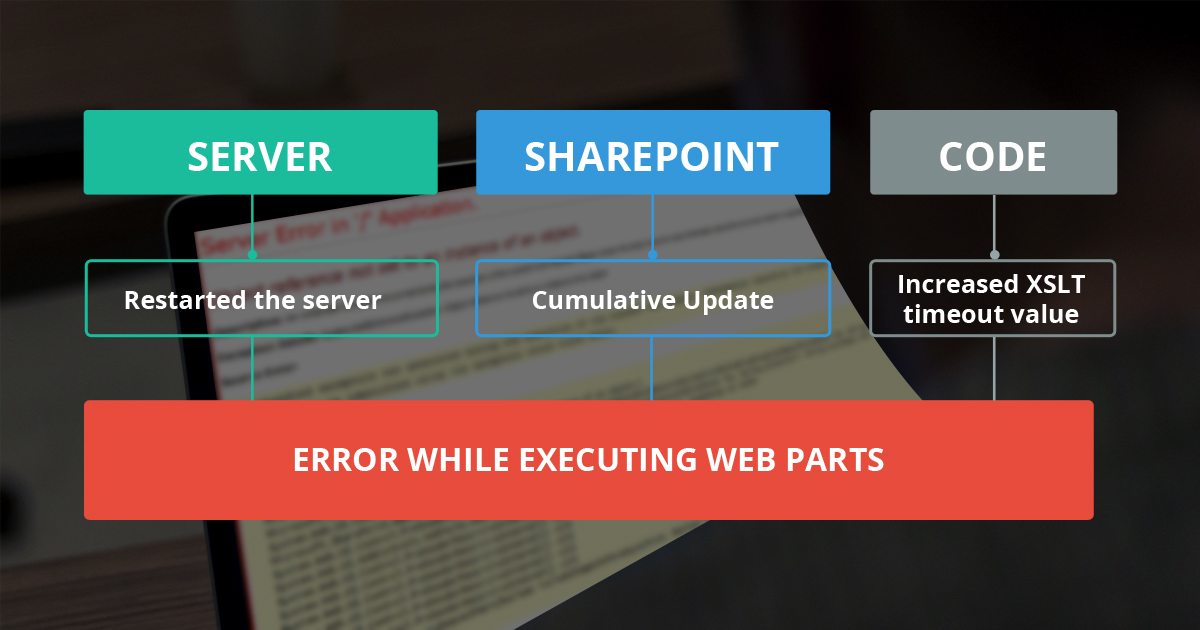
AllianceTek is sharing blog focusing on what is Web part, an Error While Executing Web Parts in SharePoint, how to troubleshooting the Error with different options and the solutions for it.
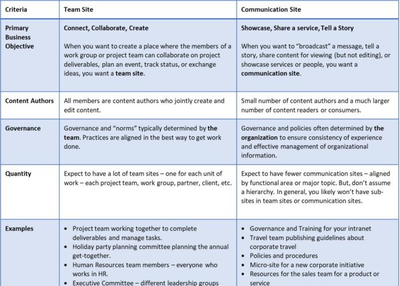
Microsoft recently started the rollout of updated Communication Sites in Office 365. This new template is currently available for First Release tenants. Once the communication sites are enabled, you get a new option where you can choose the type of website you want to create.
Choosing between a Team Site and a Communication Site should begin with your purpose and desired business results. Despite the fact that there are more areas to explore, at the most basic, consider these two utilize cases:
- Associate, Collaborate, Create: Team site is the best option to go for, When you need to design a place where the individuals from a workgroup or project team can team up on project deliverables, plan an event, track status, and exchange ideas. In a Team Site, all individuals are content creators where they mutually make and alter content. Consider team sites as a place where work gets done. For instance, suppose you are working on a project and you along with your colleagues require a place to work together on deliverables, manage and assign tasks and have discussions regarding the work. Even though everyone has individual assignments, working together create more assets. Considering all the above mentions the project team need a Team Site rather than Communication Sites.
- Showcase, Share Services, Story: Communication Site is best suited, when you need to “communicate” a message, convey a story, share content for review (however not altering), and exhibit administrations. In a Communication Site, there will regularly be a few number of content authors and a larger number of content readers and users. Consider your corporate intranet. Even if you have collaborative parts of the intranet, the basic role of your intranet is to communicate a story like corporate news, showcase services and data such as your benefits and policies. Your intranet sites are the best example of Communication Sites.
When would it be a good idea for you to create a Team Site?
Create a Team Site for each discrete group of individuals or unit of work:
If you are a long time user of SharePoint, you may feel team site is just like sub-sites. Resist the impulse to create team sites as sub-sites. Numerous administration choices (for instance, the capacity to share content outside the organization and who has the authorization to welcome new individuals to the group) are scoped to the site collection. For the most adaptability both today and in the future, each group ought to get their own particular site collection—which is precisely what happens now when you create a Team Site in Office 365. Your Team Site is associated with an Office 365 Group and is developed as a new site collection in your occupant. In case you have a lot of projects and work teams and partners, you will probably have different access and information management requirements. You will probably need to create a unique team site for each and every project regardless of the possibility that the same work team works on every project.
SharePoint Home unites all your sites:
Don’t be concerned about how your clients will keep the track of all these team sites —because SharePoint home has your back! The SharePoint homepage in Office 365 unites, for every distinct individual, news from the team sites they are following, in addition to sites they visit frequently, are following, and also sites proposed by the Microsoft Graph.
 When would it be a good idea for you to create a Communication Site?
Create a Communication Site to feature a service, showcase, relate a story:
Communication Sites offers an awesome way to feature the services of your group and recount a story regarding the launch of a new product. Even if you are equipped with a highly organized intranet based on SharePoint publishing framework, you might need to utilize a Communication Site for creating new scenarios like a companywide program, a new initiative and training site. Latest Communication Sites are ideal for your governance delivery environment since they have a unique purpose which can likely live without your intranet branding (since you can’t do much customization with them yet). You can connect them to the intranet global navigation with a link to and fro to the intranet from the best navigation of the Governance Site.
Communication Sites have 2 particular client personas:
Regularly, a Communication Site has modest number individuals who have permission to author content and much more people who just have permission to read the content.
This guide helps you choose which type of site to create that would remain helpful to create supportive, helpful to your enterprise as both Communication and Team sites are evolving. The best way to keep the track of these changes is by following the SharePoint blogs in Aufait. Aufait offers SharePoint applications depending upon your requirements and could do equity to your thoughts and upgrade your business solutions.

Internal communications software, sometimes called business messaging software, offer immediate messaging platforms to the user that permit direct and group messaging inside an organization.
The objective of these tools is to offer intuitive and convenient, facilitating quick conversations between team members.
Today’s internal communications software normally helps as the core communication system within an organization.
It helps businesses and their employees share information and files, and they're designed to connect and involve a workforce through numerous digital channels.
Free Sample Report + All Related Graphs & Charts @ : https://www.advancemarketanalytics.com/sample-report/159505-global-internal-communication-software-market Latest released the research study on Global Internal Communication Software Market offers a detailed overview of the factors influencing the global business scope.
Internal Communication Software Market research report shows the latest market insights with upcoming trends and breakdown of the products and services.