


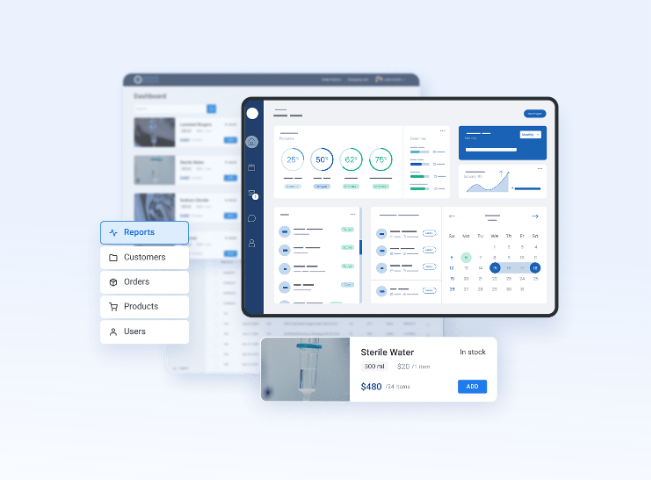
In the dynamic and highly regulated pharmaceutical industry, managing inventory with accuracy and efficiency is essential. Among the most critical aspects of pharmaceutical inventory control are expiry date tracking and batch (lot) tracking. These elements are fundamental not only to ensure patient safety but also to comply with national and international healthcare regulations.
Fortunately, modern ERP systems like Odoo offer comprehensive solutions to tackle these challenges. The Odoo Pharmacy module, built on Odoo’s powerful inventory and manufacturing frameworks, helps pharmacies manage drug inventory efficiently by enabling accurate batch tracking and expiry management.
This article explores how to effectively manage expiry dates and batch tracking using the Odoo Pharmacy module, with practical tips, real-world applications, and strategic insights.
Why Are Expiry Date and Batch Tracking Critical in Pharmacy?
Before diving into Odoo’s capabilities, it’s essential to understand the importance of managing expiry dates and batch tracking in a pharmacy setup.
1. Regulatory Compliance
Pharmacies must comply with strict regulations from bodies such as the FDA, EMA, and local drug regulatory authorities. These regulations mandate accurate records of drug batches and their expiration to facilitate traceability and recalls.
2. Patient Safety
Dispensing expired medication is a serious health risk. Effective expiry date management helps ensure that only safe, potent, and effective drugs are dispensed.
3. Inventory Optimization
Managing expiry dates helps minimize wastage due to expired stock. Batch tracking supports better forecasting and procurement decisions.
4. Recall Management
In case of a product recall, batch tracking ensures the pharmacy can identify which stock is affected and trace it back to the source—crucial for minimizing risk and reputational damage.
Overview of Odoo Pharmacy Module
The odoo pharmacy module integrates with core Odoo applications such as Inventory, Sales, Purchase, Manufacturing, and Accounting, forming a complete end-to-end ERP for pharmaceutical businesses.
Key features include:
The module enables pharmacies to operate smoothly while staying compliant with pharmaceutical best practices.
Setting Up Batch and Expiry Tracking in Odoo Pharmacy
Step 1: Enable Lots & Expiry Dates
Navigate to Inventory > Configuration > Settings and enable the following options:
Once these options are enabled, Odoo will allow you to configure lot numbers and expiry settings at the product level.
Step 2: Configure Product for Batch and Expiry Management
Go to Inventory > Products and select or create a new product (e.g., Paracetamol 500mg).
Under the Inventory tab of the product form:
This configuration ensures the product will be received, stored, and issued based on expiry priority.
Step 3: Receiving Products with Batch and Expiry Details
When you receive inventory from a supplier (via Purchase Order or Stock Transfer), Odoo prompts you to enter:
This ensures every unit of stock has a traceable lot and expiry date, allowing for granular tracking.
Managing Inventory Using Expiry and Batch Tracking
Stock Valuation and Real-time Tracking
The odoo pharmacy module provides real-time visibility into stock by:
With barcode integration, scanning a product automatically links to its lot number and expiry, ensuring fast and accurate inventory operations.
Automated Alerts and Reminders
Odoo can be configured to send automated alerts when:
These alerts can trigger actions such as internal transfers, disposal, or reordering.
Removal Strategy: FEFO vs FIFO
Pharmacies typically use FEFO (First Expiry, First Out) to ensure older products are sold before newer ones. Odoo supports this removal strategy at the warehouse or location level, reducing the risk of expired stock.
Expired Product Management and Disposals
Expired products pose a risk to health and compliance. The odoo pharmacy module streamlines the expired product handling process:
Batch Recall and Product Traceability
Odoo enables full traceability of each batch from purchase to sale. In the event of a recall:
The odoo pharmacy module thus acts as a powerful recall management tool, minimizing risk and ensuring transparency.
Reporting and Analytics
Data is only as valuable as the insights it provides. The Odoo Pharmacy module offers several analytical and operational reports to manage expiry and batch data:
These reports support better decision-making and risk mitigation.
Integrating with Other Modules
The true power of Odoo lies in its modular integration. The odoo pharmacy module connects with:
This interconnectedness provides pharmacies with an integrated, intelligent, and agile system for operations.
Real-World Use Case: Mid-Sized Pharmacy Chain
Let’s consider a mid-sized pharmacy chain with 10 branches and a central warehouse.
Challenges:
Odoo Implementation Results:
By adopting the odoo pharmacy module, the pharmacy gained better control, ensured regulatory compliance, and improved profitability.
Best Practices for Effective Expiry and Batch Management
Final Thoughts
Expiry date and batch tracking are vital for any pharmacy aiming for safety, compliance, and efficiency. The odoo pharmacy module provides a feature-rich environment to manage these processes seamlessly—from procurement to patient.
With tools for automation, alerts, traceability, and analytics, Odoo empowers pharmacies to stay compliant and competitive in a demanding industry. Whether you're a standalone pharmacy or a large chain, implementing Odoo Pharmacy can significantly streamline your inventory operations and reduce risk.

"ERP Development House" - Synconics is an official Odoo Partner which providing Odoo solutions/services from odoo implementation, odoo customisation, odoo development, odoo installation, odoo integration, odoo apps, odoo training, Support to different small, medium, and large businesses/industries to worldwide.
For Customisation, New Development, Migration, Training of any OpenERP (Odoo) apps, you can CONTACT US on: Store:- https://store.synconics.com/ Website:- https://www.synconics.com/ E-mail: contact@synconics.comSkype: synconics.technologies

SerpentCS offers Odoo Champ Training !
Enroll for odoo Functional and Technical Training.
Odoo implementer will be guiding you with use-cases throughout odoo erp training.Visit us: https://serpentcs.com/services/trainings/odoo-champ