


The Shopping Portal using Python Django & MySQL is a complete e-commerce web application designed for final year students and developers who want to learn how online shopping platforms work.
This project provides both Admin and User modules:
User Module: Users can register, log in, browse products, add them to the cart, and place orders.
Admin Module: The admin can manage product categories, add/edit/delete products, manage orders, and track customer activities.
The system is built using the Python Django framework as the backend and MySQL as the database, ensuring a powerful, secure, and scalable solution. It also includes HTML, CSS, Bootstrap, and JavaScript for the frontend design.
Buy this report: https://phpgurukul.com/shopping-portal-using-python-django-mysql/
Technologies Used
Frontend: HTML, CSS, Bootstrap, JavaScript
Backend: Python Django
Database: MySQL
Shopping Portal using Python Django & MySQL: Modules
MODULES: This project contains two modules, which are
Admin
User
MODULES DESCRIPTION:
Admin Modules
This module provides administrator-related functionalities. The administrator manages the entire application.
Dashboard: In this section, admin can briefly view the total brands, total category, total subcategory , total products, total registered users, total new orders , total in-process orders , total dispatched orders , total delivered, total new review, total approved review and total unapproved review.
Brand: In this section, admin can manage brand of products(add/update/delete).
Category: In this section, admin can manage category of products(add/update/delete).
Subcategory: In this section, admin can manage subcategory of products (add/update/delete).
Products: In this section, admin can manage products (add/update/delete).
Reviews: In this section, admin can view the reviews and have to right approved and disapproved the reviews.
Orders: In this section, admin can view the order details and they have also the right to change order status according to current status.
Search Order: In this section, admin can search particular order with the help of the order number.
Reports: In this section admin can view order details and sales reports according to dates.
Registered Users: In this section, the admin can view registered users.
Admin can also update his profile, change the password and recover the password.
User Module
1.Shop: In this section, users can view which products is available on the website
2.My Accounts: In this section, users can his/her password, view and update his/her profile and log out from accounts.
3.My orders: In this section, users can view order history after login.
4.Cart: In this section, the user can add the products which he/she want to order.
5.Wishlist: In this section, the user can add products to the Wishlist.
6.The user has also a facility to download his/her invoice and cancel orders if he/she wants to cancel.
Brief Information about the Homepage
On this page, guest users (users who are not registered) can view the products, search for products according to name and brand name. Guest users can also sign up, and the registered users can sign in. User can also track their order without login.
PHP Gurukul
Welcome to PHPGurukul. We are a web development team striving our best to provide you with an unusual experience with PHP. Some technologies never fade, and PHP is one of them. From the time it has been introduced, the demand for PHP Projects and PHP developers is growing since 1994. We are here to make your PHP journey more exciting and useful.
Email: info@phpgurukul.com
Website : https://phpgurukul.com

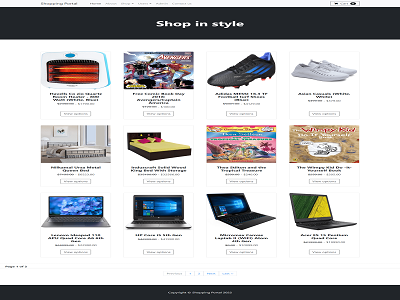

Making online shopping experience outstanding could drive more sales and lead your business more profitable, but it would be possible only when your online store or shopping portal has made out with many features that your users wish to engage with.
There are many kinds of stores online like an online store for books, online stores for furniture, online stores for groceries, and so on.
Whatever the objectives and purpose may be for the store which you going to be created, but to be striking, beautiful, and easy to understand, navigate for the users who visit your online store is more and more crucial to get engage with more people.
Magento is one of the most popular open-source eCommerce platforms written in PHP, which provides online merchants with a flexible shopping cart system, as well as control over the look, functionality, and content of their online store.
Therefore you as an online store merchant why should you deny the power of Magento for your eCommerce website.
With regards to the page load time, query processing time and other dynamic or static actions, once again Magento is the winner.