


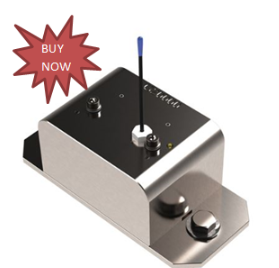
Unexpected angle deviations can compromise lift stability faster than operators realize. When cranes work in demanding environments, accurate angle feedback becomes essential for safe loading decisions and reliable LMI performance. Because of this, many equipment teams explore how to integrate the LSI Trimble GS010 Wireless Angle Sensor into their existing crane safety systems without disrupting daily operations.
Why Accurate Angle Data Matters in Modern Crane Operations
Angle measurement affects every rated-capacity calculation. When the boom position changes, even slightly, the LMI logic adjusts load limits in real time. The LSI Trimble GS010 Wireless Angle Sensor supports this process by transmitting continuous angle data to compatible LSI or Trimble displays. This helps operators maintain stability awareness, especially on cranes exposed to harsh site conditions. Trimble components do not interface with Greer systems, so integrations must remain within the LSI/Trimble ecosystem.
Pre-Integration Checks for System Compatibility
Before mounting any wireless sensor, technicians review the crane’s current monitoring setup. A structured assessment helps avoid signal conflicts, incorrect calibrations, or mismatched firmware.
Typical preparation steps include:
- Verifying that the crane’s operator console supports LSI wireless inputs.
- Checking for nearby structures that could interfere with wireless communication.
- Inspecting the boom for stable mounting points.
- Confirming that the existing system allows for angle-input pairing.
During early planning, some technicians reference the LSI GS 820 because it belongs to the same wireless family. Its configuration guidelines often help crews align communication IDs and sensor-pairing procedures.
Mounting the Sensor for Accurate Reporting
Mounting accuracy directly influences the quality of angle readings. Placement must reflect true boom movement and avoid locations prone to vibration.
Key mounting practices include:
- Selecting a rigid point that mirrors the boom’s pivot behavior.
- Keeping the sensor away from hydraulic lines that generate vibration.
- Ensuring no physical obstructions sit between the transmitter and receiver.
- Aligning the sensor bracket so readings remain consistent during boom extension.
Once mounted, the sensor undergoes a verification check to confirm stable wireless output.
Calibration and Signal Validation
Calibration ensures the crane’s measurement logic interprets the angle data correctly. This step requires careful attention, especially on machines used in high-demand lifting environments.
A standard calibration workflow may involve:
- Setting the boom at known mechanical reference angles.
- Establishing zero-point positions through the LSI menu.
- Performing controlled boom sweeps to confirm linear response.
- Monitoring wireless stability under typical movement speeds.
During calibration, technicians may compare readings with those from the LSI GS 820 during diagnostic routines. This comparison helps confirm that both devices align within acceptable tolerances without overlapping in system functions.
Integrating the Sensor With the Operator Display
Once the wiring-free setup is validated, the LSI Trimble GS010 Wireless Angle Sensor is paired with the operator display. Pairing must follow LSI’s communication protocol to ensure uninterrupted angle feedback.
Technicians typically check for:
- Strong and consistent wireless signal strength across all boom positions.
- Proper identification of the sensor within the console menu.
- Accurate angle output that matches mechanical references.
- Stable updates when the boom moves rapidly or under load.
Integration errors usually arise from signal interference or incorrect pairing IDs, not from the sensor itself.
Field Testing and Operational Verification
Before releasing the crane back to service, field testing ensures that real-world conditions do not create unexpected behavior.
This final stage often includes:
- Cycling the boom through minimum and maximum extension points.
- Confirming that alert thresholds activate correctly.
- Checking angle updates during simultaneous functions, such as swing and hoist.
- Observing system behavior under windy or uneven ground conditions.
When these checks pass, the crane can rely on the integrated wireless system for daily lifting operations across construction, industrial, and mining environments.
Conclusion
Integrating the LSI Trimble GS010 Wireless Angle Sensor into an existing crane monitoring setup enhances angle reporting and supports safer lift decisions. When combined with compatible components like the LSI GS 820, crews gain a unified wireless platform built to handle demanding operating conditions while maintaining system accuracy.
FAQs
1. How does the LSI Trimble GS010 Wireless Angle Sensor improve crane safety?
The GS010 provides continuous wireless angle data that feeds directly into compatible LSI or Trimble consoles. Since angle changes affect rated capacity, real-time feedback helps operators maintain load stability and react quickly to boom movement. This is especially important on cranes exposed to vibration, uneven terrain, or fast lift cycles.
2. Can the GS010 Wireless Angle Sensor integrate with Greer systems?
No. Trimble and LSI components do not interface with Greer systems. The GS010 must be used within the LSI/Trimble ecosystem to ensure proper pairing, calibration, and wireless communication. Technicians often reference related devices such as the LSI GS 820 to streamline configuration within compatible systems.
3. What should technicians check before installing the GS010 sensor?
Pre-integration checks include verifying that the operator console accepts LSI wireless inputs, confirming wireless communication availability around the crane, identifying stable mounting points on the boom, and ensuring the system has an input path for angle data. These steps prevent pairing failures, signal interference, and calibration issues during installation.
4. How is the GS010 Wireless Angle Sensor mounted for accurate angle reporting?
The sensor must be mounted on a rigid, vibration-free section of the boom that accurately reflects boom pivot movement. Installers avoid hydraulic lines, physical obstructions, and weak brackets. Proper alignment ensures that the boom’s full motion range—extension, sweep, and elevation—is captured clearly by the sensor.
5. What does field testing involve after integrating the GS010 sensor?
Field testing includes cycling the boom through full motion, validating that angle values match mechanical references, confirming that warning thresholds activate correctly, and ensuring stable wireless data during simultaneous movements like swing or hoist. Only after these checks pass is the crane cleared for daily use.


A lot of people think that writing a long blog will get them followers and massive traffic to their website.
To help you and make your long-form content useful, we have these must-haves of SEO.
These will help your content get more visibility, rank better, and drive more traffic to your website.Use of Long-tail KeywordsLong-term keywords are more specific and longer keyword phrases that visitors often use when using voice search or closer to the point of purchase.
When you use long-tail keywords in your long-form content, it gets you targeted traffic and makes it easy for your website to appear at the top of the search results.Extensive Keyword ResearchExtensive keyword research is essential to get the best and most suitable keyword for your content.
But, SEMrush and Google Keyword Planner are the best if you consider them for keyword research.Choose the Perfect h1 TagYour blog title or h1 is the first thing that people see for the first time, and then they decide to read your blog further or not.
Always use subheadings to break your article into small chunks so your readers can easily comprehend and enjoy it.Use Schema MarkupSchema markup is a code that helps search engines to analyze your content.