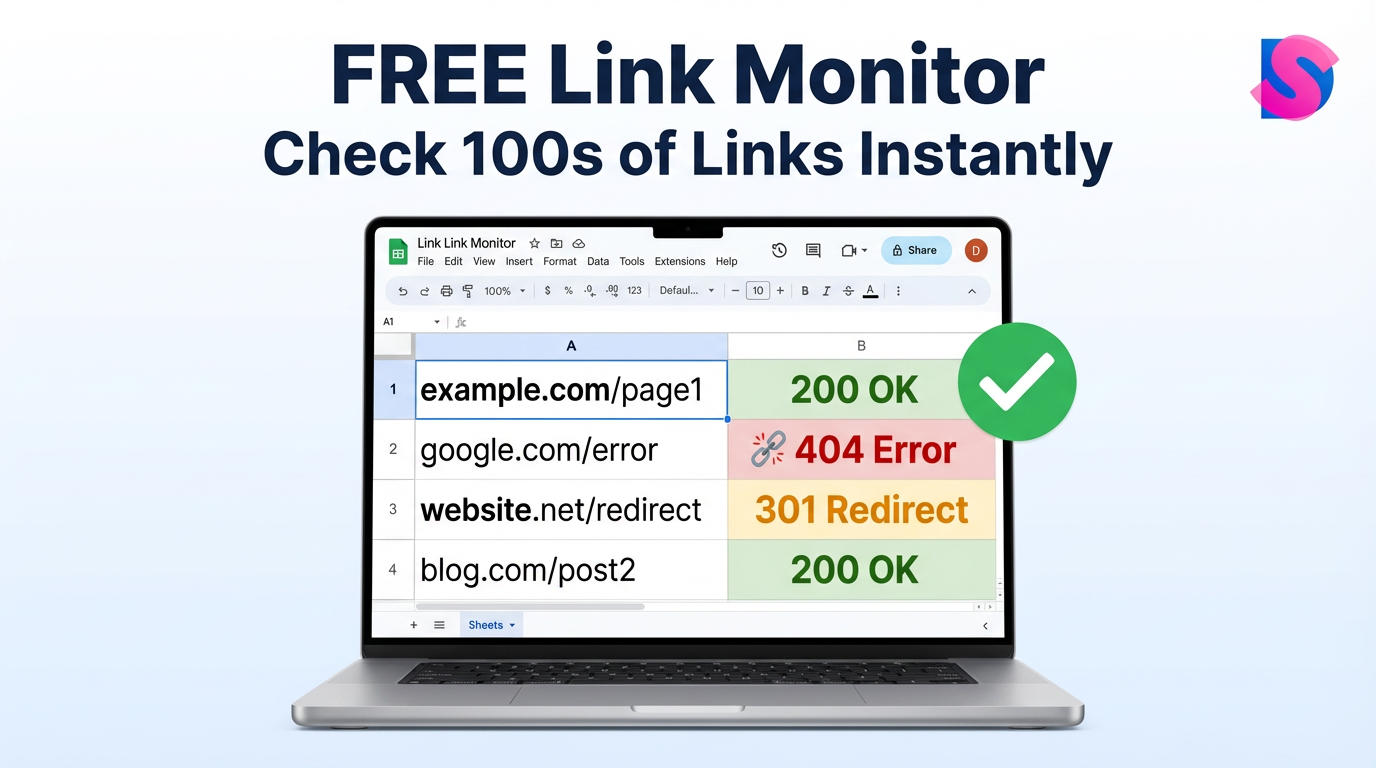
Free Link Monitor for Google Sheets™ is a free bulk link monitoring tool that helps you check broken links, URL status codes, and redirects directly inside Google Sheets—saving time, improving SEO health, and preventing traffic loss across websites at scale.
Why Link Monitoring Matters More Than Ever
Links are the backbone of every website. Internal links guide users, external links build trust, and backlinks influence rankings. But broken links silently damage:
Search visibility
User experience
Conversion rates
Brand credibility
Manual link checking is slow and unreliable—especially when you manage hundreds or thousands of URLs. This is where Free Link Monitor for Google Sheets™ becomes essential.
What Is Free Link Monitor for Google Sheets™?
Free Link Monitor for Google Sheets™ is a Google Workspace Marketplace app that lets you:
Check link status in bulk
Detect broken URLs instantly
Monitor redirects (301, 302)
Validate live vs dead pages
Work entirely inside Google Sheets
No coding. No paid software. No learning curve.
👉 Official App Page:
https://workspace.google.com/marketplace/app/free_link_monitor_for_google_sheets/1039492667305
Key Problems This Tool Solves
1. Broken Links Hurt Rankings
Search engines reduce trust when they encounter too many 404 or 500 errors.
2. Redirect Chains Waste Crawl Budget
Unnecessary redirects slow down page discovery.
3. Manual Checking Is Not Scalable
Checking links one by one is impossible for large sites.
4. Paid Tools Are Overkill
Most website owners only need fast, accurate link status checks.
Features of Free Link Monitor for Google Sheets™
✔ Bulk URL Status Checking
Paste hundreds of URLs into Google Sheets and check them at once.
✔ Broken Link Detection
Identify 404, 410, and server errors instantly.
✔ Website Redirect Checker
Track 301, 302, and redirect chains with clarity.
✔ Live Status Codes
Get real-time HTTP responses like:
200 (OK)
301 / 302 (Redirects)
404 (Not Found)
500 (Server Error)
✔ 100% Google Sheets Integration
No dashboards. No exports. Everything stays inside Sheets.
Who Should Use This Tool?
This free link monitor is perfect for:
SEO professionals
Website owners
Bloggers and publishers
Ecommerce managers
Digital marketers
Developers managing large URL lists
If you manage links, this tool saves hours every week.
How to Use Free Link Monitor for Google Sheets™
Step-by-Step Setup
Install the app from Google Workspace Marketplace
Open Google Sheets
Paste your URLs in a column
Run the link monitor
View status codes instantly
No technical setup required.
Use Cases That Drive Real Results
SEO Audits
Run a free bulk broken link checker during technical audits.
Content Updates
Validate old blog links before republishing.
E-commerce Management
Check product URLs after migrations.
Redirect Audits
Use it as a free website redirect checker tool.
Outreach Campaigns
Verify external links before link building.
Why Google Sheets Is the Perfect Platform
Using Google Sheets means:
Easy collaboration
Real-time updates
Shareable reports
No software installation
Cloud-based access
This makes Free Link Monitor for Google Sheets™ faster than standalone tools.
Comparison With Other Tools
Feature
Free Link Monitor
Paid SEO Tools
Bulk URL checking
✅
✅
Google Sheets native
✅
❌
Cost
Free
Expensive
Learning curve
Low
High
Team sharing
Easy
Limited
For most users, this free tool does the job perfectly.
How This Tool Improves Website Performance
Reduces bounce rate
Improves crawl efficiency
Prevents traffic loss
Enhances trust signals
Maintains link integrity
Healthy links = healthy website.
Trusted by Website Owners Worldwide
Thousands of users rely on Free Link Monitor for Google Sheets™ for daily link validation. It is available directly on the official Google Workspace Marketplace, ensuring security, reliability, and consistent updates.
Leave a Review & Support the Tool ⭐
If you find this tool helpful, please take a moment to rate and review it on the Google Workspace Marketplace.
👉 Review & Rate Here:
https://workspace.google.com/marketplace/app/free_link_monitor_for_google_sheets/1039492667305
📱 Tip:
You can also scan the QR code on the app page to leave a quick review.
Your feedback helps improve features and keeps the tool free for everyone.
Frequently Asked Questions (FAQ)
What is the best free link monitor for Google Sheets?
Free Link Monitor for Google Sheets™ is one of the most reliable free tools for checking broken links, redirects, and URL status directly inside Sheets.
Can I check links in bulk?
Yes, it works as a free bulk URL status checker, allowing you to test hundreds of links at once.
Does it detect redirects?
Yes, it functions as a free website redirect checker tool, showing 301 and 302 responses clearly.
Is this tool safe to use?
Yes, it is hosted on the official Google Workspace Marketplace and follows Google security standards.
Do I need technical knowledge?
No. Anyone familiar with Google Sheets can use it easily.
Final Thoughts
Broken links silently damage performance, rankings, and trust. Free Link Monitor for Google Sheets™ gives you a simple, powerful, and free way to monitor link health at scale—without leaving your spreadsheet.
If link accuracy matters to your website, this tool is a must-have.
👉 Install now and keep every link working.