


In today’s fast-paced business environment, efficiency is no longer just an advantage—it’s a necessity. Companies are under constant pressure to optimize operations, reduce costs, and enhance productivity while maintaining high-quality standards. This is where business workflow automation comes into play. By leveraging technology to automate repetitive, rule-based tasks, businesses can streamline operations, minimize human error, and free employees to focus on strategic initiatives that drive growth.
In this article, we’ll explore the concept of business workflow automation, its benefits, practical applications across industries, implementation strategies, and best practices for successful adoption.
Understanding Business Workflow Automation
At its core, business workflow automation is the process of using software tools to automatically execute a series of business tasks or processes according to predefined rules. A workflow represents the sequence of activities that a business undertakes to achieve a specific outcome, such as processing a customer order, onboarding a new employee, or generating an invoice. Automation removes manual intervention from these processes wherever possible, ensuring tasks are completed faster, more accurately, and consistently.
Unlike simple task automation, workflow automation often involves connecting multiple systems, integrating data sources, and triggering actions based on conditions. For instance, an automated sales workflow might include receiving an order, verifying inventory, generating an invoice, updating the CRM system, and sending confirmation emails—all without human intervention.
Key Benefits of Business Workflow Automation
Implementing business workflow automation can transform the way an organization operates, providing a range of tangible and intangible benefits. Some of the most significant advantages include:
1. Increased Efficiency
Manual workflows are often time-consuming and prone to delays. Automation eliminates bottlenecks by allowing tasks to run continuously without waiting for human input. For example, an automated purchase order process can instantly route approvals to managers, update inventory systems, and notify suppliers—saving hours of administrative work.
2. Reduced Errors
Human error is a major cause of inefficiency and financial loss. Automated workflows ensure consistency and accuracy by following predefined rules and eliminating the risk of mistakes like duplicate entries, missed approvals, or incorrect calculations.
3. Enhanced Productivity
By automating routine and repetitive tasks, employees can focus on higher-value activities that require creativity, problem-solving, and decision-making. This not only increases individual productivity but also contributes to overall business growth.
4. Cost Savings
Workflow automation reduces operational costs by minimizing the need for manual labor, lowering error-related expenses, and speeding up processes. Over time, these savings can be significant, especially for businesses with high transaction volumes.
5. Improved Compliance and Auditability
Many industries, such as healthcare, finance, and manufacturing, are subject to strict regulations. Automated workflows help maintain compliance by ensuring that processes follow established protocols. Additionally, automation often includes logging and reporting features, providing a clear audit trail for regulatory purposes.
6. Faster Decision-Making
Automation allows data to flow seamlessly between systems, providing real-time insights and enabling faster, data-driven decision-making. Managers can respond quickly to issues, track performance metrics, and adjust workflows as needed.
Common Use Cases of Business Workflow Automation
Business workflow automation is versatile and can be applied across various functions and industries. Here are some practical examples:
1. Human Resources
HR departments often deal with repetitive processes such as employee onboarding, leave approvals, payroll, and performance evaluations. Automation can simplify these tasks by:
Automatically sending welcome emails and assigning training modules for new hires.
Routing leave requests to the appropriate manager for approval.
Calculating payroll based on attendance records and tax rules.
Tracking employee performance metrics and generating reports.
2. Finance and Accounting
Finance teams can benefit immensely from automation. Common use cases include:
Invoice generation and approval.
Expense tracking and reimbursement processing.
Bank reconciliation and financial reporting.
Automated reminders for overdue payments.
By automating these processes, companies reduce errors, improve cash flow, and accelerate financial operations.
3. Customer Service
Customer service workflows, such as handling support tickets, routing inquiries, and following up with customers, can be automated to improve response times and service quality. For instance:
Incoming support tickets can be automatically categorized and assigned to the appropriate agent.
Follow-up emails and satisfaction surveys can be sent automatically.
CRM updates can happen in real time, ensuring all customer interactions are logged.
4. Sales and Marketing
Sales and marketing teams can use automation to manage leads, track campaigns, and nurture prospects. Examples include:
Automatically sending personalized email campaigns based on user behavior.
Scoring leads and assigning them to sales representatives.
Tracking customer interactions and updating the CRM.
Generating sales reports and analytics without manual data entry.
5. Supply Chain and Operations
In logistics and operations, workflow automation can improve efficiency and transparency:
Automatic inventory updates based on sales or production data.
Reorder alerts triggered when stock levels fall below thresholds.
Integration between suppliers, warehouses, and distribution channels.
Streamlined order fulfillment processes with minimal human intervention.
Key Components of Business Workflow Automation
To implement business workflow automation effectively, organizations must understand its key components:
1. Workflow Mapping
The first step is identifying the processes to automate and mapping out the sequence of tasks. Workflow mapping helps visualize dependencies, bottlenecks, and areas where automation can add the most value.
2. Rules and Logic
Automation relies on predefined rules and conditions to determine how tasks should proceed. For example, a rule may state that invoices over a certain amount require manager approval, while smaller amounts can be processed automatically.
3. Integration
Many workflows span multiple systems, such as CRM, ERP, HR, or finance platforms. Successful automation requires seamless integration to allow data to flow between these systems without manual intervention.
4. Notifications and Alerts
Automated workflows often include notifications to keep stakeholders informed. Alerts can be triggered when approvals are needed, tasks are completed, or exceptions occur.
5. Reporting and Analytics
Automation tools typically provide dashboards and reporting features, offering insights into process efficiency, bottlenecks, and overall performance. Analytics help businesses make data-driven decisions and continuously improve workflows.
Implementation Strategies for Business Workflow Automation
While the benefits are clear, implementing business workflow automation requires careful planning. Here are strategies to ensure success:
1. Start with a Process Audit
Begin by analyzing existing workflows to identify inefficiencies, redundancies, and pain points. Prioritize processes that are repetitive, time-consuming, or prone to errors for automation.
2. Define Clear Goals
Establish measurable objectives for automation, such as reducing processing time by 50%, eliminating manual errors, or improving customer response rates. Clear goals help assess the success of automation initiatives.
3. Choose the Right Tools
Select automation tools that fit your business needs and integrate well with existing systems. Popular tools include robotic process automation (RPA) platforms, workflow management software, and business process management (BPM) solutions.
4. Involve Stakeholders
Include employees, managers, and IT teams in the planning process. Understanding user needs and gaining buy-in is critical for smooth adoption and minimal resistance.
5. Pilot and Iterate
Start with a pilot program to test automation on a small scale. Monitor performance, gather feedback, and make necessary adjustments before rolling out automation across the organization.
6. Train Employees
Automation may change workflows and responsibilities. Provide training to help employees adapt to new processes, understand the technology, and leverage it effectively.
7. Monitor and Optimize
Automation is not a one-time task. Continuously monitor workflows, measure performance, and refine processes to maximize efficiency and address evolving business needs.
Challenges and Considerations
Despite its benefits, business workflow automation also presents challenges that organizations must address:
Complexity: Some processes are too complex or dynamic for full automation and may require a hybrid approach.
Integration Issues: Integrating multiple systems can be technically challenging and may require custom development.
Resistance to Change: Employees may fear job loss or struggle to adapt to new workflows. Transparent communication and training are essential.
Cost: Initial investment in automation tools, training, and implementation can be significant, though ROI is typically realized over time.
Security: Automated workflows often handle sensitive data, requiring robust security measures to prevent breaches and ensure compliance.
Future Trends in Business Workflow Automation
The future of business workflow automation is shaped by advancements in artificial intelligence (AI), machine learning, and cloud technologies. Key trends include:
AI-Powered Automation: Intelligent automation can handle unstructured data, make decisions, and learn from patterns, enabling more complex workflows to be automated.
Hyperautomation: Organizations are increasingly combining multiple automation technologies—RPA, AI, and analytics—to fully automate end-to-end business processes.
Integration with IoT: Automation will extend to connected devices, enabling real-time process adjustments in industries like manufacturing, logistics, and healthcare.
Low-Code and No-Code Platforms: These platforms make automation accessible to non-technical users, reducing dependency on IT departments and accelerating adoption.
Data-Driven Decision-Making: Automated workflows will increasingly incorporate predictive analytics to optimize processes and anticipate business needs.
Conclusion
Business workflow automation is no longer a luxury; it’s a critical strategy for companies looking to thrive in a competitive market. By automating repetitive tasks, reducing errors, improving efficiency, and enabling data-driven decisions, organizations can unlock significant value and focus on activities that drive innovation and growth.
Successful implementation requires careful planning, the right technology, employee engagement, and continuous optimization. As AI and advanced automation technologies evolve, the potential of workflow automation will only grow, offering businesses smarter, faster, and more resilient operations.
Investing in business workflow automation today prepares organizations for the demands of tomorrow, ensuring they remain agile, competitive, and capable of delivering exceptional value to customers and stakeholders alike.


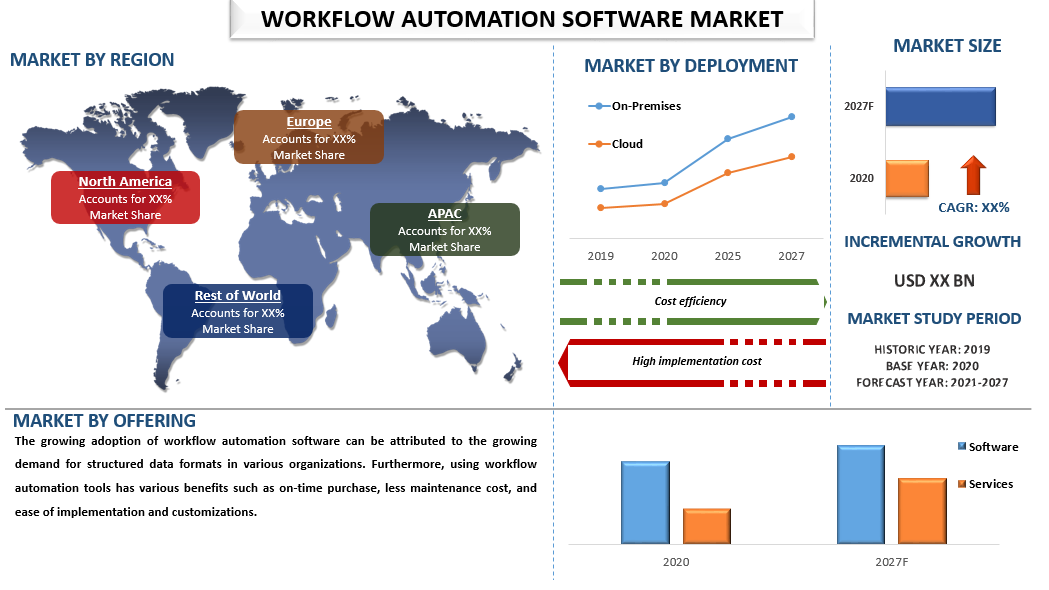


Fact.MR is the answer to all your questions based on the ongoing developments in the Business Workflow Automation market!
The report, with bull’s eye analysis, has the potential of forming the crux of the success of your organization with a focus on various parameters such as drivers, restraints, challenges, opportunities, and competitive landscape assessment.
It has caused an economic earthquake and has brought unprecedented losses.
As the world struggles to fight with the COVID-19 pandemic, policymakers, industry players, and investors in the Business Workflow Automation market are trying to tackle the deadly pandemic of economic loss.
This has made them capable of sustaining their businesses.
To paint the colors of growth on the COVID-19 affected business canvas, Fact.MR brings a thorough and detailed report on the Growth of Business Workflow Automation market through near-perfect visualization and deep information extraction.