Editing a single product photo used to take forty minutes. Masking, color correction, and resizing for different platforms—the work never ended. Now? We upload an image, click one button, and download a polished result in seconds.
That's why content creators, photographers, and small business owners are moving away from traditional editing software. The switch isn't a passing trend. It's become the default for anyone who creates visual content regularly.
Whether you're running an Etsy shop, managing social media accounts, or shooting wedding photos, the tools available today work differently from anything from even two years ago.
Why Traditional Photo Editing Software Doesn't Work for Busy Creators
We all learned image editing the hard way. Open Photoshop. Create layers. Trace around subjects with the pen tool. Spend twenty minutes removing a background that should take twenty seconds.
For photographers shooting fifty images per session, this workflow was never practical. For bloggers publishing daily content, it was simply impossible. And for small business owners who handle everything from inventory to customer service, dedicating hours to photo editing meant neglecting other essential tasks.
Hours Lost to Manual Editing Tasks
Here's what a typical editing session looked like with traditional software:
- Background removal: 15-30 minutes per image
- Color correction across a batch: 10-15 minutes
- Retouching and cleanup: 20+ minutes depending on complexity
- Resizing for multiple platforms: Another 10 minutes per set
A single photoshoot for Instagram, Pinterest, and a blog could eat up an entire afternoon just in post-processing. That's time better spent actually creating content, connecting with customers, or planning the next project.
The problem got worse as platforms multiplied. Every new social network meant another set of dimensions to export. Every marketplace requires different background standards. The editing workload kept growing while the hours in the day stayed the same.
Complex Software That Keeps Getting More Complex
Photoshop keeps adding features. More panels, more tools, more shortcuts to memorize. For creators who just want to edit photos and move on, the learning curve became a barrier rather than a help.
Many reached a breaking point: the need for professional-looking results without spending months learning complex software.
This wasn't about capability—traditional software can do extraordinary things. But most creators don't need extraordinary. They need consistent, professional-looking images delivered quickly.
How Photo Editing Changed in 2025 and 2026
The editing landscape shifted dramatically over the past two years. Tasks that required manual selection now happen automatically. Features that demanded technical expertise became available through simple one-click tools.
These changes came from improvements in how software recognizes what's in an image. Earlier tools could only detect obvious contrasts—a white product on a dark background, for example. Now, online photo editing platforms understand context, depth, and fine details.
Instant Background Removal That Actually Works
Remember when auto-select meant jagged, messy edges around subjects? Those days are over.
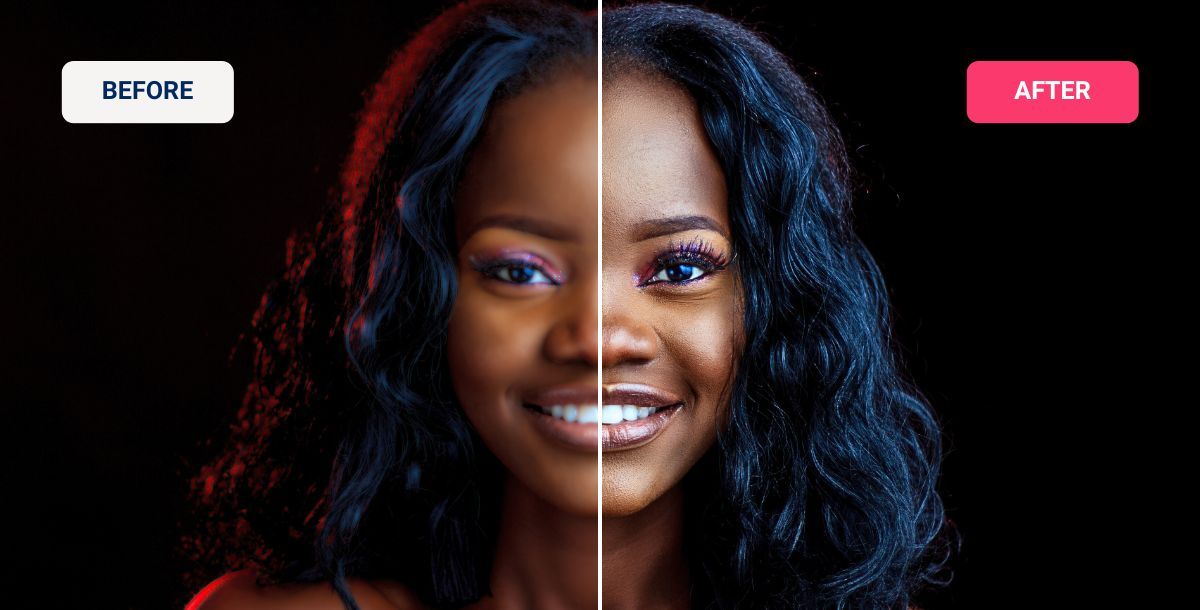
Modern online background removal tools understand the difference between hair strands and background clutter. They separate a person from a busy street scene in seconds. Product photographers get clean cutouts on the first try. Portrait photographers spend time on creative choices instead of technical corrections.
The difference is especially noticeable with difficult subjects. Jewelry with reflective surfaces. Clothing with thin straps. Products with fuzzy textures. Tasks that used to require careful manual selection now process automatically with edges that actually look natural.
Faster Processing Without Downloads or Installations
Browser-based photo editing tools now process images almost instantly. No software installation. No waiting for updates. No compatibility issues with different operating systems. Just upload, edit, download.
When background removal takes three seconds instead of three minutes, creators experiment more. They compare different edits and make better creative decisions because the cost of trying something new is essentially zero.
This speed also changes how we approach projects. Instead of batching all editing work into one marathon session, many creators now edit as they go. Take a photo, remove the background, upload the product listing—all within the same hour.
Real Ways Creators Save Time with Online Photo Editing Tools
Let's look at the specific workflows saving the most time in 2026.
How Small Sellers Create Professional Product Photos
Small business owners on Etsy, Amazon, and Shopify often shoot product photos at home. Kitchen tables, living room floors, temporary setups in spare rooms. The challenge isn't the photography itself—it's making those photos look professional enough to compete with established brands.
Modern editing platforms handle this in seconds. Upload a product image, remove the cluttered background, and replace it with clean white. What used to need a dedicated photo studio now happens on a laptop between packing orders.
The difference shows up directly in sales. Clean, professional photos build trust with buyers. Consistent backgrounds create a cohesive brand look. And when adding new products takes minutes instead of hours, sellers can expand their catalogs faster.
Instacut Studio has made this process especially straightforward. Their instant background removal handles everything from jewelry to clothing, giving sellers the polished product images they need—without creating an account first.
Batch Editing for Social Media Content
Creating content for social platforms means constant output. One photoshoot needs to produce images for Instagram stories, feed posts, Pinterest pins, and blog headers. Each platform has different dimensions and aesthetic expectations.
Smart resizing and format conversion tools eliminate the tedious work of creating multiple versions manually. Batch processing handles consistency across entire sets. What took an afternoon now takes fifteen minutes.
This consistency matters more than many creators realize. Audiences develop expectations about how content looks. When colors and brightness stay consistent across posts, the overall feed looks intentional and professional. When each image looks slightly different, the whole presence feels disorganized.
Batch editing tools make this consistency automatic instead of demanding careful manual attention on every single image.
Faster Delivery for Wedding and Portrait Photographers
Wedding photographers see the biggest time savings. A single wedding produces hundreds of photos needing consistent editing. Without faster tools, delivery takes days.
Online editing tools learn preferences and apply them across entire galleries. Photographers make creative decisions on a few key images, and the software applies similar adjustments to everything else. Full galleries that took days now go out within hours.
This speed improves client relationships, too. Couples sharing photos quickly with family and friends feel the excitement while memories are fresh. Photographers who deliver fast build reputations for reliability that lead to referrals.
Portrait photographers report similar benefits. Same-day sharing for family sessions. Quick turnarounds for professional headshots. The editing step no longer creates a bottleneck between the shoot and the delivery.
What to Look for in an Online Photo Editing Tool
Not every editing tool delivers useful results. After testing dozens of platforms, here's what actually matters for creators.
Background Removal Speed and Accuracy
The best tools complete background removal in seconds, not minutes. More importantly, they get edge detection right on the first try.
Cheap tools leave halos around subjects or blur fine details like hair and fur. Quality tools preserve these details without manual fixes. Test with a difficult image—something with fine edges or complex textures—before committing to any platform.
No Sign-Up Required to Test the Tool
Nothing kills a workflow like mandatory account creation just to try something. The most creator-friendly platforms let us upload and process images without signing up first. Registration can wait until we're ready to commit.
This matters especially when comparing multiple tools. The ability to quickly test three or four options without creating accounts for each one saves significant time and frustration.
Honest Pricing Without Hidden Limits
Free trials that limit resolution or add watermarks rarely win over skeptical creators. Look for tools that match how creators actually work—pay per image, pay per month, or a generous free tier without surprise restrictions.
Watch out for tools that offer unlimited use but cap resolution at unusable levels. A free background removal that outputs at 500 pixels wide isn't actually useful for anything except social media thumbnails.
Professional Results Without Professional Skills
The goal is one-and-done editing. Upload, process, download. When automatic edits need manual fixing, we've just traded one type of work for another.
The best tools produce results that go straight from download to final use without intermediate steps. No touching up edges. No adjusting colors to fix automatic corrections. No second passes to catch what the first attempt missed.
The Real Reason Creators Are Making the Switch
Creators got tired of fighting their tools.
Traditional editing software was built for specialists who would spend careers mastering every feature. But the creator economy brought millions of new people who need good-enough results quickly, not perfect results eventually.
The tools winning in 2026 understand this shift. They're built for people who have content to create, not for people who want editing to be their main activity.
Time Savings Add Up Fast
Consider the math. Saving twenty minutes per image across ten images weekly gives back seventeen hours every month. That's seventeen hours for shooting new content, engaging with audiences, or just living life outside of editing software.
Over a year, those hours turn into entire weeks of reclaimed time. Time that goes into growing a business, developing creative skills, or simply reducing the constant pressure of content creation deadlines.
Automatic Consistency Across Image Libraries
Brand consistency used to need detailed style guides and careful manual matching. Now, editing tools apply the same adjustments across entire image libraries automatically. Same color temperature, same brightness levels, same overall look—without checking each image individually.
This consistency builds professional credibility. Customers recognize consistent visual style, even if they can't articulate why one shop looks more trustworthy than another.
Creative Decisions Get the Attention They Deserve
When technical tasks get handled automatically, attention shifts to what actually matters: Where should this shot be cropped? What mood should the lighting create? Which image tells the better story?
These are the questions that shape great visual content. Smart tools give us space to focus on them by handling everything else.
Tips for Switching From Traditional Software to Online Editing Tools
Transition doesn't mean starting over. Most online editing tools work alongside existing workflows rather than replacing them.
Start With One Specific Task
Try a specialized tool for instant background removal before overhauling the entire workflow. See the time savings firsthand on tasks that used to take the longest.
Background removal makes a good starting point because it's universal. Every creator eventually needs it, and the difference between manual and automatic processes is immediately obvious.
Keep Desktop Software for Complex Projects
Online tools excel at common tasks: background removal, batch resizing, and basic color correction. Keep traditional software for detailed compositing or highly specific effects.
This hybrid approach combines the speed of online tools with the depth of desktop software. Use each where it works best rather than forcing everything through one solution.
Let Results Guide the Expansion
Once one automated step saves hours weekly, expanding to other features becomes obvious. Many creators gradually shift their entire workflow as they discover what works.
There's no need to switch everything at once. Let the improvements prove themselves before moving on to the next task.
What Matters Most: Getting Time Back for Creative Work
The creators thriving in 2026 aren't necessarily the ones with the most technical editing skills. They're the ones who figured out which parts of their workflow deserve attention and which parts should be handled automatically.
That's the real reason for the switch. Not because the technology is impressive—but because it gives creators their time back for the work that actually matters.
Need to remove backgrounds from product photos or portraits quickly? Try Instacut Studio for instant results—no account required.