
How to check the status of GCMS notes is one of the most common questions asked by Canada visa, study permit, work permit, PR, and citizenship applicants. After submitting an ATIP request, many applicants feel anxious while waiting and are unsure how to track their GCMS notes or what different status updates mean.
This in-depth 1500-word guide explains everything you need to know about checking the status of GCMS notes, including step-by-step instructions, timelines, status meanings, delays, solutions, and expert tips. If you need help at any stage, you can also contact info@findgcmsnotes.com for guidance.
What Are GCMS Notes?
GCMS (Global Case Management System) notes are the official internal records used by IRCC (Immigration, Refugees and Citizenship Canada) and CBSA (Canada Border Services Agency) to process immigration and visa applications. These notes provide transparency into your file and show exactly how visa officers are assessing your case.
GCMS notes typically include:
- Visa officer comments and observations
- Eligibility assessment (Passed / Review Required)
- Background, security, and criminality checks
- Medical examination status
- Document verification history
- Reasons for delay or refusal (if applicable)
GCMS notes are requested through an ATIP (Access to Information and Privacy) request and are delivered in PDF format by email.
Why Checking the Status of GCMS Notes Is Important
Knowing how to check the status of GCMS notes helps you:
Confirm that your ATIP request was received
Understand whether processing has started
Identify extensions or delays early
Avoid missing the final delivery email
Plan your next immigration steps with confidence
Checking the status does not affect your visa or PR application in any negative way.
When Can You Check the Status of GCMS Notes?
You can check the status of GCMS notes after submitting your ATIP request. There is no need to wait until the 30-day deadline.
Recommended times to check:
- 7–10 days after submission
- If you receive an extension notification
- After 30 days with no response
- If more than 45–60 days have passed
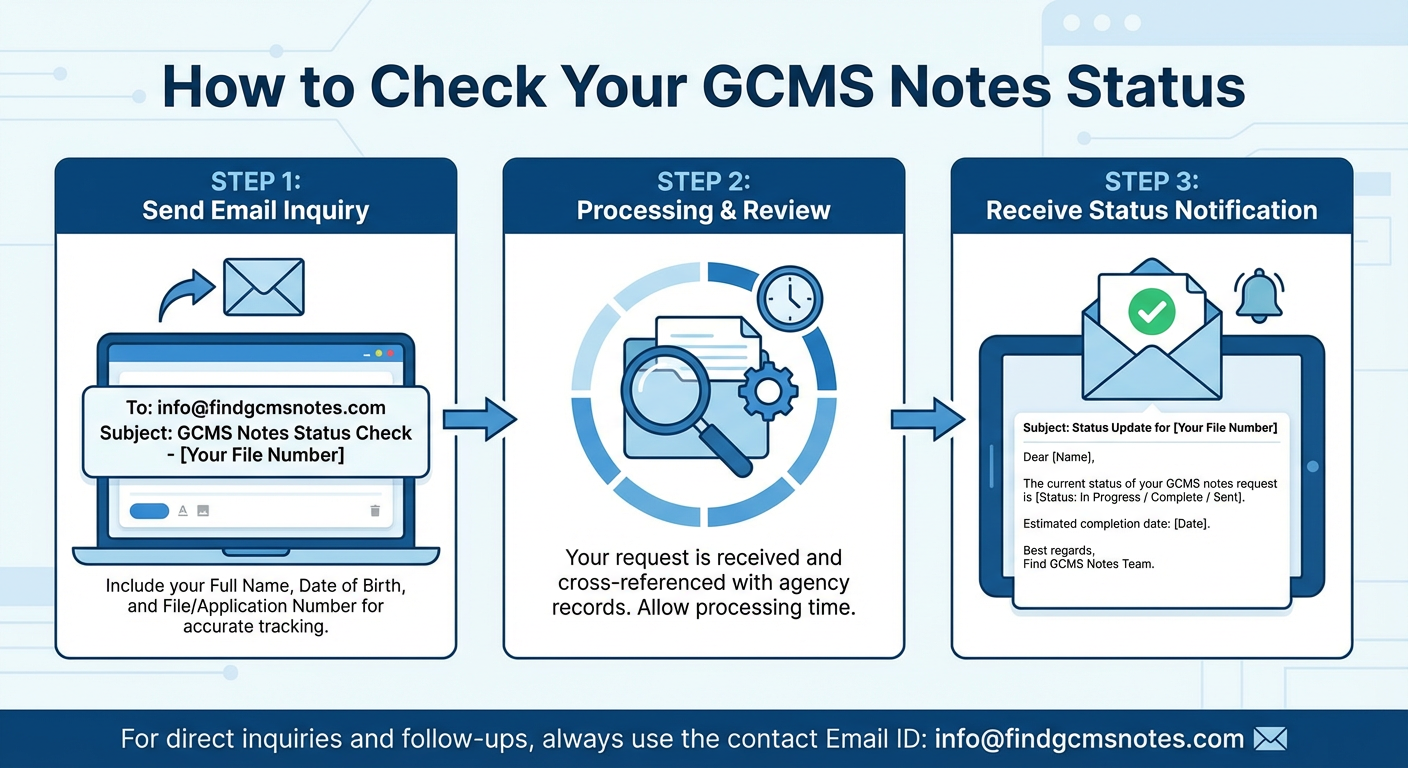
How to Check the Status of GCMS Notes (Step-by-Step)
Step 1: Locate Your ATIP Request Number
After submitting your GCMS notes request, you receive a confirmation email from the ATIP system. This email contains:
- ATIP request number (very important)
- Date of submission
- Department selected (IRCC or CBSA)
You cannot check the status without this request number.
Step 2: Visit the ATIP Online Status Page
To check your GCMS notes status:
- Open the Government of Canada ATIP Request Status page
- Select the department:
- IRCC (Immigration, Refugees and Citizenship Canada), or
- CBSA (Canada Border Services Agency)
3. Enter your ATIP request number
4. Submit the form
The system will display the current status of your GCMS notes request.
Step 3: Check Status Through a Service Provider
If you ordered GCMS notes through a professional service provider, you can usually:
- Log in to your customer dashboard
- Track order progress in real time
- Receive email updates
- Get assistance if delays occur
For support or updates, you may contact info@findgcmsnotes.com.
GCMS Notes Status Types and Their Meanings
Understanding the status messages is essential when learning how to check the status of GCMS notes.
1. Submitted / Received
Meaning:
- Your ATIP request was successfully submitted
- The department has received your request
- Processing has not started yet
This status is common during the first few days.
2. In Progress
Meaning:
- Your request is actively being processed
- Records are being retrieved from internal systems
- Privacy redactions are underway
Most GCMS notes requests remain In Progress for several weeks.
3. Extended
IRCC and CBSA are legally allowed to extend processing time beyond 30 days. Extensions occur due to:
- High volume of ATIP requests
- Complex immigration files
- Multiple dependents or applications
- Security or third-party consultations
Extensions may add 30–60 days or more.
4. Completed
Meaning:
- Your GCMS notes are finalized
- The file has been released
- Notes are sent to your registered email address
Always check your spam or junk folder once the status shows Completed.
5. Closed
Meaning:
- The ATIP request has ended
- GCMS notes were already delivered
- No further action is required
How Long Does It Take to Receive GCMS Notes?
The official processing timeline for GCMS notes is 30 calendar days, but delays are common.
- Typical timelines:
- Simple cases: 30–40 days
- Extended cases: 45–90 days
- Complex or security-related cases: 90+ days
Delays in GCMS notes do not mean your visa application is delayed or refused.
Common Reasons for GCMS Notes Delays
If you are repeatedly checking and wondering how to check the status of GCMS notes, delays are often caused by:
- High ATIP request volume
- Ongoing background or security checks
- Multiple visa offices handling the file
- Officer workload
- Technical or administrative issues
These delays are normal and routine.
Final Thoughts
Understanding how to check the status of GCMS notes gives you transparency, confidence, and control over your Canadian immigration journey. From tracking your ATIP request to interpreting status updates and managing delays, staying informed helps you make better decisions.
GCMS notes are a powerful tool for applicants facing delays, confusion, or refusals. If you need help ordering, tracking, or understanding your GCMS notes, professional support is available at info@findgcmsnotes.com.