


A database management system (DBMS) is software that lets users and applications create, store, retrieve, update, and manage data in a structured, controlled way. It sits between the raw data and the people or programs using it, enforcing consistency, security, and concurrent access so that many users can work with the same data safely. This guide explains what a DBMS is, its core components, the main types, and how to choose the right one.
Why databases need a management system
Before DBMS software, data lived in flat files, and every application had to handle storage, searching, and updating on its own. That approach caused duplicated data, inconsistency, no concurrency control, and constant risk of corruption. A DBMS solves these problems by providing a single, governed layer for all data operations — so applications simply ask for data and the DBMS handles the how.
Core components of a DBMS
A DBMS is made up of several cooperating parts:
● Storage engine — reads and writes the actual data to disk efficiently.
● Query processor / optimizer — interprets queries (usually SQL) and chooses the fastest way to execute them.
● Data dictionary (metadata catalog) — stores the structure of the database: tables, columns, data types, and constraints.
● Transaction manager — guarantees that groups of operations complete reliably and consistently.
● Concurrency control — lets many users read and write simultaneously without corrupting data.
● Security and access control — manages who can see and change what.
● Backup and recovery — protects against data loss and enables restoration after a failure.
What a DBMS actually does
At a functional level, a good DBMS delivers:
● CRUD operations — Create, Read, Update, and Delete data.
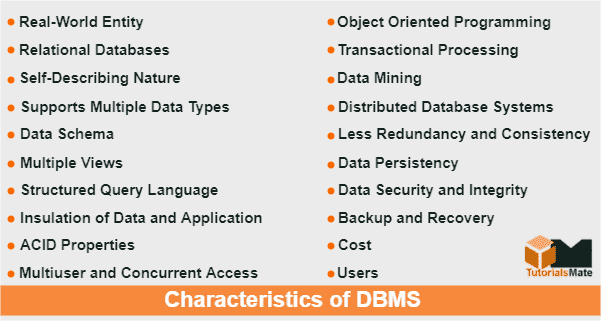
● ACID transactions — Atomicity, Consistency, Isolation, and Durability, ensuring that a transaction either fully completes or fully rolls back, and that committed data survives failures.
● Data integrity — enforcing rules (constraints, keys) so data stays valid.
● Concurrency — many simultaneous users without conflicts.
● Security — authentication, authorization, and often encryption.
● Backup and recovery — point-in-time restore and disaster recovery.
Types of database management systems
There are several DBMS models, each suited to different data and workloads.
Relational DBMS (RDBMS) — stores data in tables of rows and columns, linked by keys, and queried with SQL. Relational databases enforce strict schemas and ACID transactions, making them the standard for structured, transactional data. Examples: Oracle, Microsoft SQL Server, MySQL, PostgreSQL.
NoSQL DBMS — a family of non-relational systems built for scale, flexibility, and unstructured or semi-structured data. The main sub-types are:
● Document stores (e.g., MongoDB) — store JSON-like documents with flexible schemas.
● Key-value stores (e.g., Redis) — extremely fast lookups by key.
● Column-family stores (e.g., Cassandra) — optimized for wide, distributed datasets.
● Graph databases (e.g., Neo4j) — model relationships between entities directly.
Hierarchical and network DBMS — older models organizing data in tree or graph structures; still found in legacy systems.
Object-oriented DBMS — store data as objects, aligning with object-oriented programming.
Cloud / Database-as-a-Service (DBaaS) — managed database offerings where the provider handles infrastructure, patching, and scaling.
The trade-off is often framed as ACID vs BASE. Relational systems prioritize strict consistency; many NoSQL systems trade some consistency for scalability and availability. Neither is "better" — the right choice depends on your data and how it's accessed. Many modern architectures use both (polyglot persistence).
Popular DBMS examples
● Oracle Database — enterprise-grade relational database for mission-critical workloads.
● Microsoft SQL Server — widely used relational database in enterprise and Microsoft-centric environments.
● MySQL / PostgreSQL — leading open-source relational databases powering web applications.
● MongoDB — the most popular document database for flexible, developer-friendly data.
● Redis — in-memory key-value store used for caching and real-time data.
Benefits of using a DBMS
Adopting a proper DBMS delivers reduced data redundancy, stronger data integrity and consistency, controlled multi-user access, robust security, reliable backup and recovery, and better performance through indexing and query optimization. Together these turn data from a liability into a dependable business asset.
Managing your DBMS well
Choosing a DBMS is only the start — the value comes from configuring, securing, tuning, and maintaining it over time. Our database management services keep your databases healthy, secure, and performant across platforms, and our database consulting services help you select and architect the right DBMS for your workload.
Frequently asked questions
What is the difference between a database and a DBMS?
A database is the organized collection of data itself. A DBMS is the software that manages that data — creating, storing, retrieving, and securing it. You interact with the database through the DBMS.
What are the four main types of DBMS?
The most common classification is relational (RDBMS), NoSQL (non-relational), hierarchical, and network — though NoSQL itself includes document, key-value, column-family, and graph sub-types.
Is SQL a database management system?
No. SQL (Structured Query Language) is the language used to query and manage relational databases. The DBMS is the software (like Oracle or SQL Server) that runs those SQL commands.
What does ACID mean in a DBMS?
ACID stands for Atomicity, Consistency, Isolation, and Durability — the four properties that guarantee database transactions are processed reliably, even during failures.