Implementing an enterprise asset management system is an important step toward improving maintenance efficiency, controlling operational costs, and extending equipment life. However, purchasing and implementing advanced software does not automatically guarantee better results. Employees must understand how to use the system effectively and apply its features to their everyday responsibilities.
This is where Maximo software training becomes essential. A well structured training program ensures that employees understand the functions relevant to their positions, follow consistent processes, and use accurate information to support business operations.
One of the most common mistakes organizations make is providing identical training to every employee. Maintenance technicians, planners, inventory specialists, supervisors, and executives have different responsibilities. Therefore, their learning requirements should also differ.
Developing a role based training strategy helps organizations improve user adoption, reduce operational errors, and achieve greater value from their investment in asset management technology.
1. Understand Organizational Roles Before Starting Training
The first step toward successful training is identifying who will use the system and what they need to accomplish.
Different departments interact with asset management software in different ways. For example, maintenance technicians primarily work with assignments, inspections, labor reporting, and work orders. Planners focus on scheduling, job plans, preventive maintenance, and resource allocation.
Similarly, inventory specialists manage spare parts, stock movements, purchase requests, and inventory records. Supervisors monitor work progress, approve activities, and review maintenance performance.
Before designing a training program, organizations should:
- Identify all departments that will use the system.
- Document the daily responsibilities of each user group.
- Determine which applications and functions each role requires.
- Assess existing employee knowledge and technical skills.
- Establish clear learning objectives for every department.
This assessment creates a practical training framework that avoids unnecessary information and allows employees to concentrate on relevant activities.
2. Develop Role Specific Maximo Software Training Modules
A successful training program should be divided into modules based on job responsibilities. This approach makes learning more focused and improves knowledge retention.
Training for Maintenance Technicians
Technicians are among the most frequent users of maintenance management systems. Their training should concentrate on everyday maintenance activities.
Important topics include:
- Viewing and accepting assigned work orders.
- Recording labor hours and materials.
- Updating equipment conditions.
- Completing inspections and maintenance tasks.
- Reporting problems and documenting completed work.
- Closing work orders accurately.
Practical exercises should allow technicians to complete sample maintenance assignments from beginning to end.
Training for Maintenance Planners
Planners require a deeper understanding of maintenance scheduling and resource management.
Their training should cover preventive maintenance programs, job plans, labor requirements, maintenance priorities, and work scheduling.
They should also learn how to analyze maintenance histories and identify recurring equipment problems.
Proper training helps planners coordinate resources more effectively and develop maintenance schedules that minimize unnecessary downtime.
Training for Inventory and Storeroom Teams
Inventory accuracy directly affects maintenance performance. If essential spare parts are unavailable, equipment repairs may be delayed.
Storeroom employees should learn how to manage inventory records, process material receipts, issue spare parts, monitor stock levels, and conduct inventory counts.
Training should emphasize accurate data entry because incorrect inventory information can create purchasing problems and increase operational expenses.
Training for Supervisors and Managers
Managers need a broader understanding of system capabilities and operational reporting.
Their training should include work order approvals, maintenance backlogs, performance dashboards, resource utilization, and maintenance cost analysis.
Executives may require additional guidance on interpreting performance indicators and using operational reports to support strategic decisions.
3. Choose the Right Training Format for Different Employees
Not every employee learns effectively through traditional classroom instruction. Organizations should select training methods according to employee responsibilities, schedules, and technical experience.
A blended learning approach often produces better results.
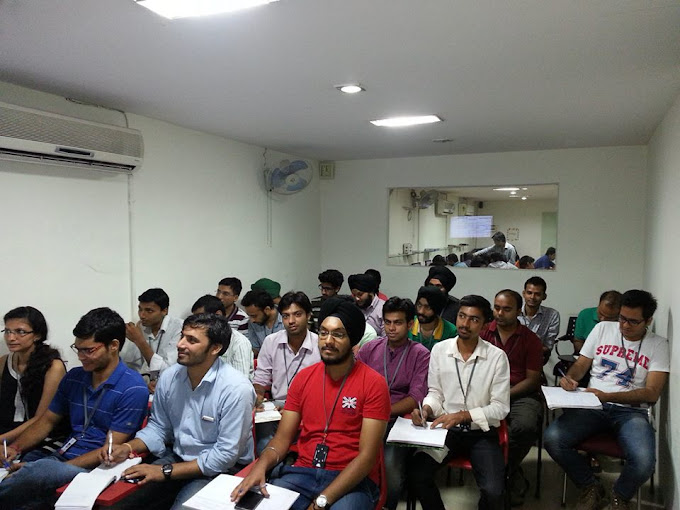
Instructor Led Training: Classroom or virtual sessions allow employees to interact with instructors, ask questions, and complete guided exercises.
Hands On Workshops: Practical workshops help employees understand real system workflows. Participants can practice creating work orders, updating records, and managing maintenance activities.
Video Tutorials: Short recorded lessons allow employees to revisit specific topics whenever required.
Quick Reference Guides: Simple instructions and screenshots provide convenient support for frequently performed tasks.
On the Job Training: Employees learn directly through supervised activities within their working environment.
Combining these methods creates a flexible learning experience that accommodates different learning preferences and operational requirements.
4. Focus on Practical Exercises and Real Business Scenarios
One of the most important elements of effective Maximo software training is practical application.
Employees may understand theoretical concepts during presentations but struggle when they encounter actual maintenance activities.
To overcome this challenge, training exercises should reflect real organizational workflows.
For example, technicians can practice receiving a maintenance assignment, recording labor hours, requesting spare parts, and completing a work order.
Planners can create preventive maintenance schedules based on equipment requirements, while inventory specialists can practice processing stock transactions.
Organizations should also introduce common error scenarios so employees understand how to identify and correct incorrect entries.
Practical learning provides several advantages:
- Improves employee confidence.
- Reduces mistakes during daily operations.
- Strengthens understanding of system workflows.
- Encourages consistent data entry practices.
- Helps employees become productive more quickly.
The objective is to ensure that employees can independently perform their responsibilities after completing training.
5. Schedule Training Around the Implementation Timeline
Training should be carefully coordinated with the software implementation schedule.
Providing training too early may result in employees forgetting important information before the system becomes operational. Delivering it too late can create confusion during the initial deployment.
A structured timeline can help organizations prepare employees effectively.
During the Planning Stage
Identify user groups, assess skill requirements, define learning objectives, and prepare training materials.
Before Implementation
Conduct role based sessions and provide access to a suitable practice environment.
During Go Live
Offer additional assistance to employees as they begin using the system for actual business activities.
After Implementation
Organize refresher sessions, address common challenges, and introduce advanced topics when employees become comfortable with basic functions.
This continuous approach helps employees transition smoothly from traditional processes to digital maintenance workflows.
6. Develop Internal Trainers and Department Champions
Large organizations often have hundreds of employees working across different locations and departments. Providing direct support to every individual can become difficult.
Developing internal trainers is an effective way to address this challenge.
Selected employees receive advanced instruction and become familiar with important system functions. They can then guide colleagues, answer common questions, and help resolve basic operational issues.
Department champions provide several benefits:
- Faster assistance for employees.
- Consistent communication between departments.
- Reduced dependency on external support.
- Better knowledge sharing.
- Stronger long term training capabilities.
Internal trainers should also receive updated learning materials whenever system configurations or organizational procedures change.
7. Keep Training Materials Updated
Asset management systems evolve as organizations improve their workflows, introduce new features, and modify operational requirements.
Training documents must reflect these changes.
Outdated instructions can create confusion, especially when employees follow procedures that no longer match the system configuration.
Organizations should regularly review user manuals, instructional videos, process documents, and quick reference guides.
It is also useful to maintain a centralized knowledge repository where employees can access approved training resources.
A well maintained knowledge base reduces repeated questions and encourages independent learning.
8. Provide Continuous Support After Training
Training should not end when employees complete their initial sessions. Users often encounter unfamiliar situations after working with the system for several weeks.
They may need help understanding advanced functions, correcting data entry errors, or following updated maintenance procedures.
Maven Asset Management supports organizations through professional training, implementation guidance, and ongoing asset management assistance. Its focus on practical learning helps businesses improve user understanding, strengthen system adoption, and align software capabilities with operational requirements.
Having access to experienced specialists gives employees additional confidence and helps organizations address challenges without returning to disconnected spreadsheets or manual processes.
Organizations should also establish a clear support process so employees know where to report technical problems and request assistance.
9. Include Training in Employee Onboarding Programs
Employee turnover and internal role changes can affect system consistency.
New employees may join maintenance, inventory, procurement, and operational departments throughout the year. Without proper onboarding, they may develop incorrect working habits or enter incomplete information.
Organizations should create a standard onboarding program covering:
- An introduction to the asset management system.
- Department specific applications and responsibilities.
- Data entry requirements and organizational procedures.
- Work order and maintenance workflows.
- Available training materials and support resources.
Providing structured onboarding ensures that new employees develop the necessary skills before independently handling system related responsibilities.
It also helps maintain consistent operational practices across departments.
10. Measure Training Effectiveness and Improve Continuously
A training program should be evaluated through measurable business outcomes rather than attendance records alone.
Organizations should determine whether employees can perform their assigned activities accurately and independently.
Useful performance indicators include:
Work Order Accuracy: Evaluate whether employees provide complete information when creating and closing work orders.
Maintenance Compliance: Monitor whether preventive maintenance activities are completed according to schedule.
Inventory Accuracy: Review whether material transactions and stock records are maintained correctly.
User Adoption: Examine how consistently employees use the system instead of relying on manual records.
Training Feedback: Collect employee feedback to identify difficult topics and opportunities for improvement.
Regular assessments help organizations identify knowledge gaps and determine where additional instruction is necessary.
11. Common Mistakes to Avoid When Planning Training
Even well funded training initiatives can produce disappointing results when important factors are overlooked.
Organizations should avoid the following mistakes:
Providing Identical Training to Everyone: Different employees require different knowledge and system access.
Relying Only on Presentations: Employees need practical exercises to understand everyday workflows.
Ignoring Post Implementation Support: Users require assistance when unfamiliar situations arise.
Using Outdated Materials: Training resources should reflect current system configurations.
Overloading Employees With Information: Training should be divided into manageable sessions with clear learning objectives.
Avoiding these mistakes helps create a sustainable learning environment and improves the overall effectiveness of the implementation.
Frequently Asked Questions
1. What is Maximo software training?
Maximo software training teaches employees how to use an enterprise asset management system for maintenance planning, work order management, inventory control, asset tracking, and operational reporting.
2. Who should receive Maximo software training?
Maintenance technicians, planners, supervisors, inventory specialists, procurement teams, IT professionals, and executives can benefit from role specific training based on their responsibilities.
3. Why is role based Maximo training important?
Role based training ensures employees learn the functions they actually need. It reduces unnecessary learning, improves productivity, strengthens user adoption, and minimizes operational mistakes.
4. How long does Maximo software training take?
Training duration depends on the employee's responsibilities, previous experience, system configuration, and learning objectives. Basic user training may require a few sessions, while advanced administrative training may take considerably longer.
5. What topics should Maximo training cover?
Important topics include asset management, work orders, preventive maintenance, inventory management, job plans, maintenance scheduling, reporting, and mobile applications.
6. Is practical training necessary for Maximo users?
Yes. Practical exercises help employees understand real workflows, improve confidence, and apply their knowledge to everyday maintenance and operational activities.
Conclusion
Building an effective training strategy requires more than organizing a few software demonstrations. Organizations must understand employee responsibilities, identify learning requirements, and provide practical instruction that reflects actual business operations.
A well designed Maximo software training program helps technicians perform maintenance activities accurately, enables planners to coordinate resources, improves inventory control, and gives managers better operational visibility.
Equally important is the commitment to continuous learning. Refresher sessions, updated documentation, internal trainers, and post implementation assistance help employees maintain their skills as business requirements evolve.
Maven Asset Management supports organizations looking to strengthen their asset management practices through professional training and implementation assistance. By investing in the right learning strategy, businesses can improve system adoption, increase workforce productivity, and gain greater long term value from their asset management investment.

If you are willing to give a fresh start to your career, then TEFL will be an excellent choice for you.
It is a fact that TEFL courses are not so easy.
Once you complete the course, then you will get to know tons of lessons and skills.
If you are still looking for an online platform, then you can also try Maximo Nivel.
There are plenty of other factors which are related to TEFL or English teaching abroad.You should know about all those factors because it will help in learning more skills.
Your passport- with a visa stamped inside As mentioned ahead of that, you should consider all those requirements which are necessary for teaching English abroad.