


Michael Jordan

0

0

2


Prestashop Custom Registration Field allows you to add limitless types of options and custom fields how much you want. By using this module you would be able to add more extra fields on customer registration/signup. You can add Text, Checkbox, Dropdown, Multi-select, Support Fields, Message only box, Yes and No options and more other field types. Configure placement of fields and make it optional or mandatory. It also allows the customer to edit their information by signing in their accounts.
Screen Shot


0
0
2
Michael Jordan
From the Author


Related Articles
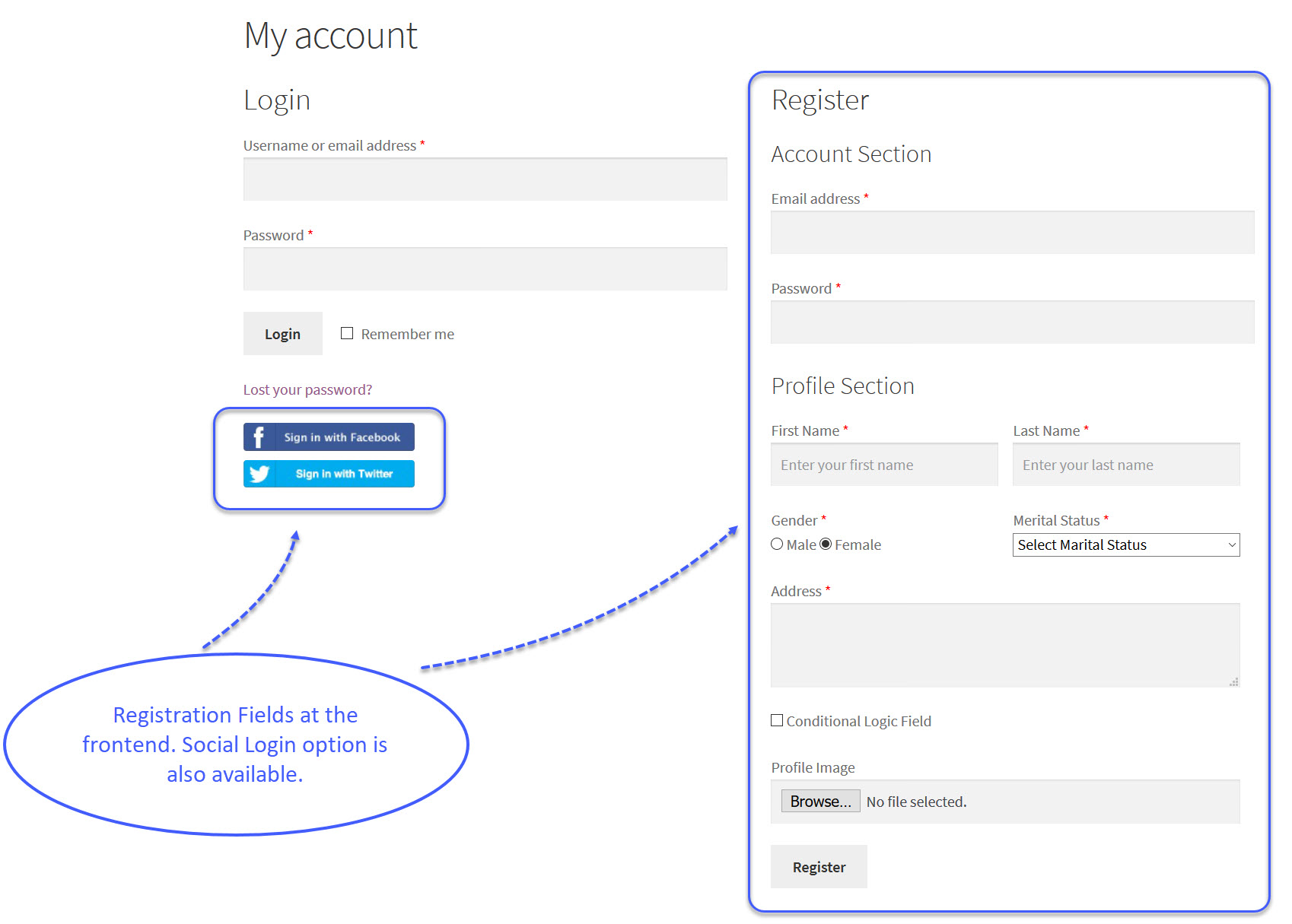
WooCommerce does not allow you to customize the user registration page.
But with the help of WooCommerce add registration fields plugin by Extendons you can edit the signup form.
It enables 10 types of fields in the back office which you can easily drag and drop into the sign-up form.
WooCommerce add registration fields plugin also allows you make the fields mandatory or you can also hide the fields as well.
It is a perfect addon which helps you to get extra details from customers.
You can add the following fields in registration form
• Text area• Text box• Select box• Checkbox• Multi-select box• Radio button• Time picker• Date Picker• Password• File or image upload
See WooCommerce Registration Conversation
Screeshots:
0
1
With the Magento 2 Add Custom Field to Checkout extension you may make the checkout internet web page greater user-best and informative via way of means of which include all the required fields. On the Magento 2 checkout web, page, you may moreover allow clients to create accounts. The default checkout web page in Magento 2 consists of the best primary data. The module helps Text and Textarea subject sorts by including custom checkout fields. All the custom fields are displayed on the client order view web page in addition to the admin order view web page.
0
3
With the custom user registration fields for WooCommerce, you can design custom forms with as many custom fields as you like for your customers. Text areas, text boxes, checkboxes, multi-select boxes, radio buttons, time pickers, date pickers, password fields, file upload fields, color pickers, and numeric fields are all available for addition. On the checkout page, you may choose whether to display new registration fields aside from the picture field. Additionally, you can enable or disable the Facebook and Twitter login capability as well as other important WooCommerce fields. 14 Different Field Types to Customize the Registration PageEdit Default WooCommerce Registration Fields or Enable/Disable Add Dependent/Conditional FieldsUser Roles Must Be Enabled on the Registration PageSpecify unique user roles and capabilitiesAuto or Manual User and Role ApprovalAutomatically grant requested user roles with limited accessManage users, including blocking, deleting, changing user roles, and limiting accessTo Add New Fields, Drag and Drop the Fields.
0
3