



Student Management System Introduction
Student management system using PHP and MySQL is a web-based application. Student Management Project is software that is helpful for students as well as the school authorities. In the current system, all the activities are done manually. It is very time-consuming and costly. Our online Student Management System in PHP deals with the various activities related to the students.
Project Requirements
Project NameStudent Management System in phpLanguage UsedPHP5.6, PHP7.xDatabaseMySQL 5.xUser Interface DesignHTML, AJAX,JQUERY,JAVASCRIPTWeb BrowserMozilla, Google Chrome, IE8, OPERASoftwareXAMPP / Wamp / Mamp/ Lamp (anyone)
Student Management System Project Modules
The two main users involved in this system are
- User(i.e. Students)
- Admin
Admin:
- Dashboard: In this section, admin can see all detail in brief like Total Classes, Total Students, Total Class Notices and Total Public Notices.
- Class: In this section, admin can manage class (Add/Update/Delete).
- Students: In this section, admin can manage the students (Add/Update/Delete).
- Notices: In this section, the admin can manage notices (Add/Update/Delete).
- Public Notices: In this section, the admin can manage public notices.
- Pages: In this section admin, can manage about us and contact us page of administration
- Search: In this section admin, can search students by their student id.
- Reports: In this section admin, can view how much students has been register in particular period.
- Admin can also update his profile, change the password and recover the password.
User (Students):
- Dashboard: It is welcome page for students.
- View Notices: In this section, user can view notices which are announced by administrator.
- Student can also view his profile, change the password and recover the password.
User (Non-Register):
- Home: It is welcome page for user.
- About: User can view about us page.
- Contact: User can view contact us page.
How to run the Student Management Project using PHP and MySQL
1. Download the project zip file
2. Extract the file and copy studentms folder
3.Paste inside root directory(for xampp xampp/htdocs, for wamp wamp/www, for lamp var/www/Html)
4.Open PHPMyAdmin (http://localhost/phpmyadmin)
5. Create a database with the name studentmsdb
6. Import studentmsdb.sql file(given inside the zip package in SQL file folder)
7. Run the script http://localhost/studentms
Admin Credential
Username: admin
Password: Test@123
Credential for Student / User panel :
Username: anujk3
Password: Test@123
Or Register a new Student/User.
Blog : https://phpgurukul.com/student-management-system-using-php-and-mysql/



Probably, every PHP programmer had to create his own framework or library, and it was necessary to work quickly and do everything practically from scratch.
Often we need to test some of our ideas or algorithms and we write code for interacting with databases directly, without using ORM frameworks.
We bring to your attention an article in which the SQL-manager built-in in CodeLobster PHP IDE will be considered.
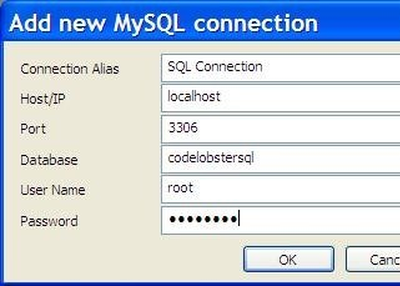
Creating and configuring a connection to MySQL
Go to the main menu "Tools" -> "MySQL" -> "SQL Manager".
Also, do not forget that the real data insertion will occur only after clicking the "Post Edit" button.