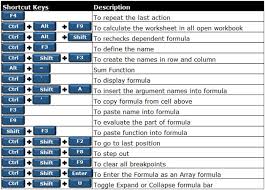


Introduction:
Are you aspiring to excel in the field of computers? Whether you're a student looking to boost your skills or a professional aiming for career growth, mastering Microsoft Excel can be a game-changer. With its vast array of formulas and functions, Excel is an indispensable tool for data analysis, reporting, and decision-making. In this blog post, we'll explore most powerful Excel formulas that will help you become an Excel expert.
VLOOKUP:
This function allows you to search for a value in a table and return a corresponding value from the same row.
INDEX and MATCH:
These functions work together to perform advanced lookup operations, offering more flexibility than VLOOKUP.
SUMIF and SUMIFS:
These functions allow you to sum values based on specific criteria, such as matching certain conditions.
COUNTIF and COUNTIFS:
Similar to SUMIF and SUMIFS, these functions count the number of cells that meet specific criteria.
AVERAGEIF and AVERAGEIFS:
These functions calculate the average of cells that meet certain criteria.
IF, IFERROR, and IFNA:
These logical functions allow you to perform conditional operations and handle errors gracefully.
CONCATENATE:
This function combines text from multiple cells into a single cell.
TEXT:
This function converts a value to text in a specific number format.
TRIM:
Use this function to remove extra spaces from text, which can be handy when dealing with data imported from external sources.
LEN:
This function returns the length of a text string, allowing you to perform text manipulation tasks.
LEFT, RIGHT, and MID:
These functions extract substrings from a text string based on specified starting and ending positions.
LOWER, UPPER, and PROPER:
These functions change the case of text to lowercase, uppercase, or title case, respectively.
DATE and TIME:
These functions allow you to work with date and time values, performing calculations and formatting as needed.
EOMONTH:
This function returns the last day of the month, making it useful for financial and accounting tasks.
NETWORKDAYS:
Use this function to calculate the number of working days between two dates, excluding weekends and holidays.
ROUND and ROUNDUP:
These functions round numbers to a specified number of decimal places, with ROUNDUP always rounding up.
RAND and RANDBETWEEN:
These functions generate random numbers, useful for simulations and modeling.
SUMPRODUCT:
This powerful function multiplies corresponding arrays and then sums the products, allowing for complex calculations.
TRANSPOSE:
Use this function to switch the orientation of a range of cells from rows to columns or vice versa.
PMT:
This function calculates the periodic payment for a loan or investment, taking into account interest rate and other parameters.
HLOOKUP:
Similar to VLOOKUP but for horizontal lookup tables, this function searches for a value in the first row of a table and returns a value in the same column from a specified row.
By mastering these Excel formulas, you'll be well-equipped to handle a wide range of data analysis tasks with ease. Whether you're pursuing a MIS Reporting and Data Analytics or seeking Microsoft Office skills, understanding Excel is essential. Consider enrolling in a course or training center that offers comprehensive Excel training to sharpen your skills and boost your career prospects. With dedication and practice, you'll soon become an Excel expert capable of tackling any challenge that comes your way.
Suggested Blogs:





Browse the Re RockSpace Local website and get the latest things that will make Rockspace wifi extender setup easy.
Which offers you 24/7 support across the globe and set up your range extender that easily connects to your current network by using advanced tools and software.