


Excel is an incredibly powerful tool for data analysis and management. Mastering its key formulas and functions can significantly enhance your productivity and efficiency. Here are the top 5 Excel formulas and functions you must master today.
1. VLOOKUP
VLOOKUP (Vertical Lookup) is essential for searching for specific information in your data. It allows you to find and return data from a specific column in a table.
Example Usage:
excel
Copy code
=VLOOKUP(lookup_value, table_array, col_index_num, [range_lookup])
Use VLOOKUP to search for a value in the first column of a table and return a value in the same row from another column.
2. SUMIFS
SUMIFS is a powerful function that allows you to sum values based on multiple criteria.
Example Usage:
excel
Copy code
=SUMIFS(sum_range, criteria_range1, criteria1, [criteria_range2, criteria2], ...)
Use SUMIFS to add up all the values in a range that meet multiple conditions.
3. IF
The IF function is fundamental for logical comparisons and decision-making in your data.
Example Usage:
excel
Copy code
=IF(logical_test, value_if_true, value_if_false)
Use IF to perform a logical test and return one value for a TRUE result, and another for a FALSE result.
4. INDEX and MATCH
INDEX and MATCH are often used together to create a more flexible and powerful lookup than VLOOKUP. INDEX returns the value of a cell in a given range based on row and column numbers, while MATCH finds the position of a value within a range.
Example Usage:
excel
Copy code
=INDEX(return_range, MATCH(lookup_value, lookup_range, 0))
Use INDEX and MATCH together to look up and retrieve data dynamically.
5. TEXT Functions
TEXT functions like CONCATENATE (or the newer CONCAT and TEXTJOIN), LEFT, RIGHT, and MID are crucial for manipulating text strings.
Example Usage:
excel
Copy code
=CONCATENATE(text1, [text2], ...)
=LEFT(text, num_chars)
=RIGHT(text, num_chars)
=MID(text, start_num, num_chars)
Use these functions to combine, extract, and manipulate text strings within your data.
Why These Formulas Matter
Mastering these Excel functions will enable you to perform complex data analysis, automate repetitive tasks, and create dynamic reports that are crucial for decision-making. They form the backbone of efficient data handling in Excel.
Curious to dive deeper into each of these functions and see real-world examples of their applications? Want to unlock the full potential of Excel and become a data wizard?
Read more about this in the full blog. Discover step-by-step guides, tips, and tricks to mastering these essential Excel formulas and functions!
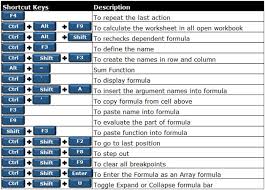

So do entrepreneurs, when they are taking into consideration which offerings to keep and which ones to retire. And if you think excel is not going to help you then you might be wrong. Yet so many people are there who are never even giving Excel a chance which is not so good. Excel is not only for making tables. The point is Countif, cells, formulas or anything; you can learn it all through a single excel training.

Coin Master Free Spins Link TodayCoin Master free spins are a surprising structure to continue playing after your one small step at a time spins run out.
If you play Coin Master, you get 5 or 6 spins every hour, up to a store of 50 or 60.
Notwithstanding, envision a condition where you are close to completing a town or getting a chest and they are no more.
By then, these extra spins can get you just to the edge you need.
Free spin links are spent on one small step at a time by Coin Master and starting at now, give you those links.It can comprehend that when you check with the hurting for complimentary spin links you, in like way, discover coin links.
These links are fabulously standard when you begin to play.