If you’re exploring ways to work with databases in your .NET applications, ADO.NET is a term you’ve definitely come across. Whether you’re just starting your journey or have been dabbling in C# for a while, understanding the architecture of ADO.NET can be a game-changer. This blog is for anyone in India who’s curious about ADO.NET Tutorials For Beginners and wants to take the next step in coding.
Let’s break down what ADO.NET really is and how it works under the hood.
What is ADO.NET?
ADO.NET stands for ActiveX Data Objects for .NET. It is a set of classes that helps developers like you and me connect .NET applications to various data sources — like SQL Server, Oracle, or even Excel files.
So if you've ever wondered “How does my C# code pull data from a database and display it on a webpage?” — ADO.NET is the answer.
It’s fast, efficient, and designed to handle both connected and disconnected data operations.
Why Should You Care About ADO.NET?
Let’s say you’re building a student registration system or an online shopping cart. These apps need to fetch, update, and manage data. Without a solid way to connect and manage your data, your application will fall apart.
That’s where ADO.NET helps. It allows you to:
And the best part? It’s built into the .NET framework, which means you don’t need to install anything extra.
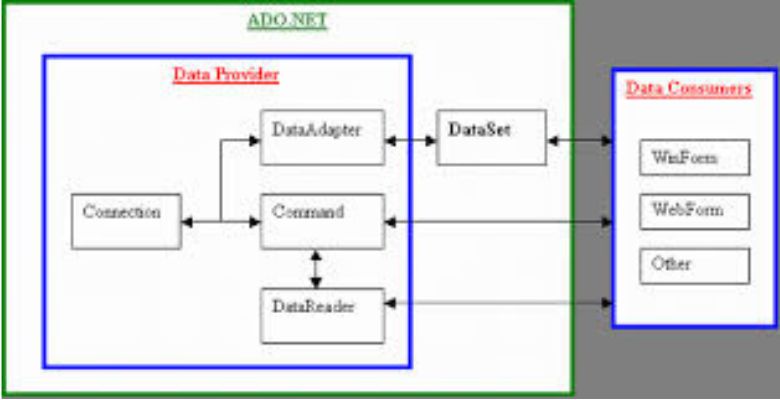
The Architecture of ADO.NET – Explained Simply
Now let’s dive into the heart of ADO.NET: its architecture.
We’ll keep it simple and to the point. The ADO.NET architecture is based on two main components:
1. Connected Architecture
This is used when your application needs a constant connection to the database. It involves:
If you're displaying real-time stock prices or processing live transactions, connected architecture is your best bet.
2. Disconnected Architecture
This is perfect when you don’t need a constant connection. It’s used in most modern apps where data can be fetched, worked on offline, and updated later. The key players here are:
Imagine a mobile app syncing customer records — that’s disconnected architecture in action.
Other Important Components You Should Know
Here are a few more building blocks you’ll use regularly while working with ADO.NET:
All these components work together to give you full control over your data — securely and efficiently.
How It All Works Together – A Simple Flow
That’s it! It’s like placing an order at a restaurant — you make a request, the kitchen (database) processes it, and your dish (data) is served. If you’re taking leftovers (offline data), you store them (DataSet) and maybe reorder later.
Ready to Learn More?
If you're serious about getting hands-on with ADO.NET and building powerful database-driven applications, don't stop here. Take action and enroll in the ADO.NET course by Sharpencode.
Why Sharpencode?
👉 Start your ADO.NET journey today with Sharpencode and build the kind of apps that people actually use.

Final Thoughts
Learning ADO.NET isn’t just about writing a few lines of code. It’s about unlocking the power of your application to talk to databases — a skill every serious developer needs.
Remember, coding is like solving puzzles. Once you understand how each piece fits (like the ADO.NET architecture), everything starts to make sense.
So if you're looking for ADO.NET Tutorials For Beginners that are practical, clear, and made for Indian learners — Sharpencode has your back.
Happy coding!



Master your skills with soft pastel painting for beginners' tutorials.
Comes with 10 different pastel art tutorials to help you create beautiful paintings.