Still Stuck on One Bar? You’re Not the Only One
It’s 2025. Cars are talking to each other, fridges reorder groceries, and your TV probably knows more about your schedule than you do. And yet -your Telstra mobile signal disappears the moment you step into the laundry or answer a call on the back patio.
Sound familiar?
Even in this hyper-connected era, mobile signal dropouts are still messing with your calls, texts, and data – especially if you rely on Telstra, Australia’s largest and most widely used network. If you’ve been quietly suffering from poor reception, it might be time you looked into a real solution: the Telstra mobile signal booster.
Why Telstra Signal Drops Still Happen (Even in 2025)
Let’s clear something up: Telstra isn’t the villain here. It actually has one of the strongest coverage networks in the country. But that doesn’t mean your home or office is magically immune to dead zones.
Here are some culprits that could be wrecking your bars:
- Modern building materials (especially concrete and metal) that block signals
- Distance from the nearest Telstra tower, common in rural or semi-rural areas
- Hilly terrain or dense vegetation, especially if you’re on the edge of coverage
- Interference from other electronics or structures
- Carrier overload – yep, even Telstra gets slammed during peak hours
And honestly, the number of times I’ve heard people say, “It’s weird — my neighbor has full bars and I’ve got none,” proves that signal coverage can be hyper-local. Sometimes it’s just your house or your room that’s the issue.
What Exactly Is a Telstra Signal Booster?
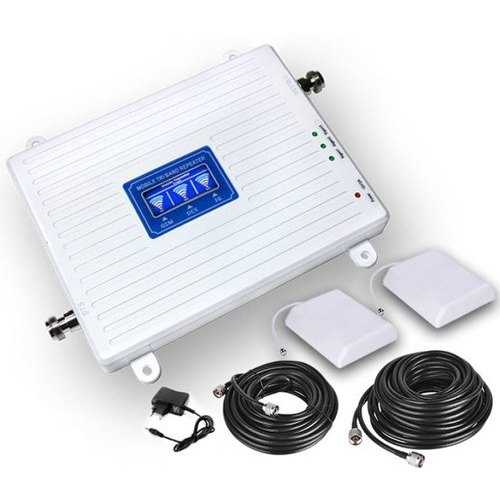
So here’s the tech fix: A Telstra mobile signal booster is a device that captures weak Telstra signal from outside your building, amplifies it, and redistributes it indoors.
In simpler terms:
Think of it like your mobile signal’s personal gym and megaphone. Weak signal walks in, strong signal walks out.
A standard setup includes:
- An external antenna (usually mounted on your roof)
- An amplifier (the actual “booster”)
- An indoor antenna that rebroadcasts the improved signal
And the best part? Reputable providers (like Fixtel) offer Telstra-approved, ACMA-compliant solutions — no black-market hardware that risks fines or interference.
What People Are Actually Saying (Yes, It Works)
Take a stroll through Whirlpool, Reddit r/Australia, or even ProductReview.com.au, and you’ll see story after story of users who went from zero bars to full coverage with a booster:
“We live just outside of town and could barely get Telstra reception inside the house. Since installing a booster, it’s been full bars all day.” – Whirlpool user in VIC
“Telstra support told me there was nothing they could do — Fixtel got it fixed in a day.” – Redditor from rural QLD
For businesses, especially those in industrial zones, warehouses, or remote offices, a signal booster isn’t just convenient — it’s essential.
Picking the Right Telstra Booster: What to Look For
Not all boosters are created equal, and here’s where things can get a little techy (but not too scary). When choosing a Telstra signal booster, you’ll want to consider:
Coverage Needs
- Small spaces (1–2 rooms)? Get a compact indoor unit.
- Full house or multi-level office? Go for a heavy-duty booster.
- Warehouses or farm sheds? You’ll likely need a commercial-grade setup.
Frequency Bands
Make sure it supports Telstra’s 4G (700MHz, 1800MHz) and 5G bands if you want to future-proof your setup.
Professional Installation
Boosters aren’t plug-and-play like WiFi routers. A qualified technician will assess your building, place antennas properly, and make sure the booster doesn’t cause interference (or worse, just amplify noise).
ACMA Approval
Don’t cut corners. Only use boosters that are ACMA-compliant. Illegal devices can jam networks — and trust me, Telstra (and the government) takes that very seriously.
But I’ll Be Honest – Here’s What I Don’t Know
I’m not a Telstra engineer, so I won’t pretend to know what spectrum upgrades they’re rolling out next quarter or how their small-cell rollout strategy works. But what I do know is this: mobile boosters are no longer niche gadgets.
They’ve gone mainstream — because they work.
Still, there are some unknowns worth watching:
- Will Wi-Fi calling and VoLTE eventually replace the need for boosters altogether?
- How will Telstra’s 5G standalone network affect signal indoors in rural areas?
- Could we see built-in signal boosters in smart homes of the future?
There’s a lot still evolving – but as of now, a booster remains your best bet if your bars keep ghosting you.
Final Thoughts: Stop Putting Up with Dropouts
Let’s face it: You’re tired of stepping outside to take calls or watching your phone buffer endlessly while standing right next to the window. A Telstra mobile signal booster won’t change your life – but it will change how connected you feel.
Whether you’re working from home, managing a rural property, or running a business, don’t let poor reception ruin your day. Boost it, fix it, and move on – with all five bars where they belong.