

Running an online store isn’t just about setting it up and waiting for sales to roll in. Whether you use Shopify or WooCommerce, regular website maintenance is crucial to keep your store secure, fast, and user-friendly. Neglecting updates, backups, or performance checks can lead to slow pages, lost sales, and frustrated customers.
However, here’s the challenge: Shopify and WooCommerce are distinctly different platforms, each with its own unique maintenance requirements. Understanding these differences can save you time, money, and headaches in the long run.
In this article, we’ll break down what Shopify and WooCommerce are, compare their key differences, and give you a step-by-step maintenance checklist for both platforms. By the end, you’ll know exactly how to keep your e-commerce store running smoothly, no matter which platform you choose.
What is Shopify?
Shopify is a hosted e-commerce platform that lets businesses create and manage an online store without dealing with technical setup. Everything - from hosting and security to platform updates - is handled by Shopify itself. This makes it a popular choice for business owners who want a simple, reliable way to sell online.
With Shopify, you get ready-made themes, built-in payment options, and an organized dashboard to manage products, orders, and customers. Most maintenance tasks happen automatically in the background, so store owners don’t need to worry about server issues or software updates.
Why businesses choose Shopify:
- Easy setup with minimal technical knowledge
- Automatic platform updates and security patches
- Reliable hosting and performance
- Large app store to extend functionality
Who Shopify is best for:
Shopify works well for startups, growing businesses, and brands that want a low-maintenance platform. If you prefer a system where most technical responsibilities are handled for you, Shopify offers peace of mind and consistency.
What is WooCommerce?
WooCommerce is an open-source e-commerce plugin built for WordPress. Instead of being a hosted platform like Shopify, WooCommerce gives you full control over your online store—but with that control comes more responsibility for setup and maintenance.
With WooCommerce, you choose your own hosting, themes, and plugins. This flexibility makes it a powerful option for businesses that want a highly customized store or already use WordPress for their website. However, updates, security, and performance are mostly handled by the site owner or their development team.
Why businesses choose WooCommerce:
- Complete control over design and functionality
- No platform lock-in
- Large ecosystem of plugins and themes
- Ideal for content-driven and SEO-focused websites
Who WooCommerce is best for:
WooCommerce is a strong choice for businesses that need flexibility and customization. If you’re comfortable managing WordPress or have a developer handling technical tasks, WooCommerce allows you to tailor every part of your store to your business needs.
WooCommerce vs Shopify: Understanding Platform Differences
Before diving into the maintenance checklist, it’s important to understand how WooCommerce and Shopify differ at a platform level. These differences directly affect how much time, effort, and technical involvement maintenance requires.
1. Platform Setup and Control
Shopify is a fully hosted platform. Hosting, security, and core updates are managed by Shopify, which means less hands-on work for store owners.
WooCommerce runs on WordPress and is self-hosted. You’re responsible for hosting, updates, and technical setup, giving you more control but also more maintenance tasks.
For businesses switching between platforms or restructuring their store setup, professional website migration services can help ensure data, products, and SEO value are transferred safely without disrupting operations.
2. Maintenance Responsibility
With Shopify, most technical maintenance happens automatically. Platform updates, security patches, and server performance are handled behind the scenes.
With WooCommerce, maintenance is more manual. You need to update WordPress core files, WooCommerce, plugins, and themes regularly to avoid conflicts or security issues.
3. Flexibility and Customization
WooCommerce offers deep customization. You can modify almost every aspect of your store, from design to functionality, using plugins or custom code.
Shopify is more structured. Customization is possible through themes and apps, but you work within Shopify’s framework and limitations.
4. Security and Updates
Shopify includes built-in security, SSL certificates, and compliance features, which reduces risk for store owners.
WooCommerce security depends on how well the site is maintained. Strong hosting, security plugins, regular updates, and backups are essential.
5. Ongoing Effort Required
Shopify requires less day-to-day technical effort, making it easier for non-technical business owners.
WooCommerce requires ongoing attention but offers greater long-term control for businesses that want to manage everything themselves.
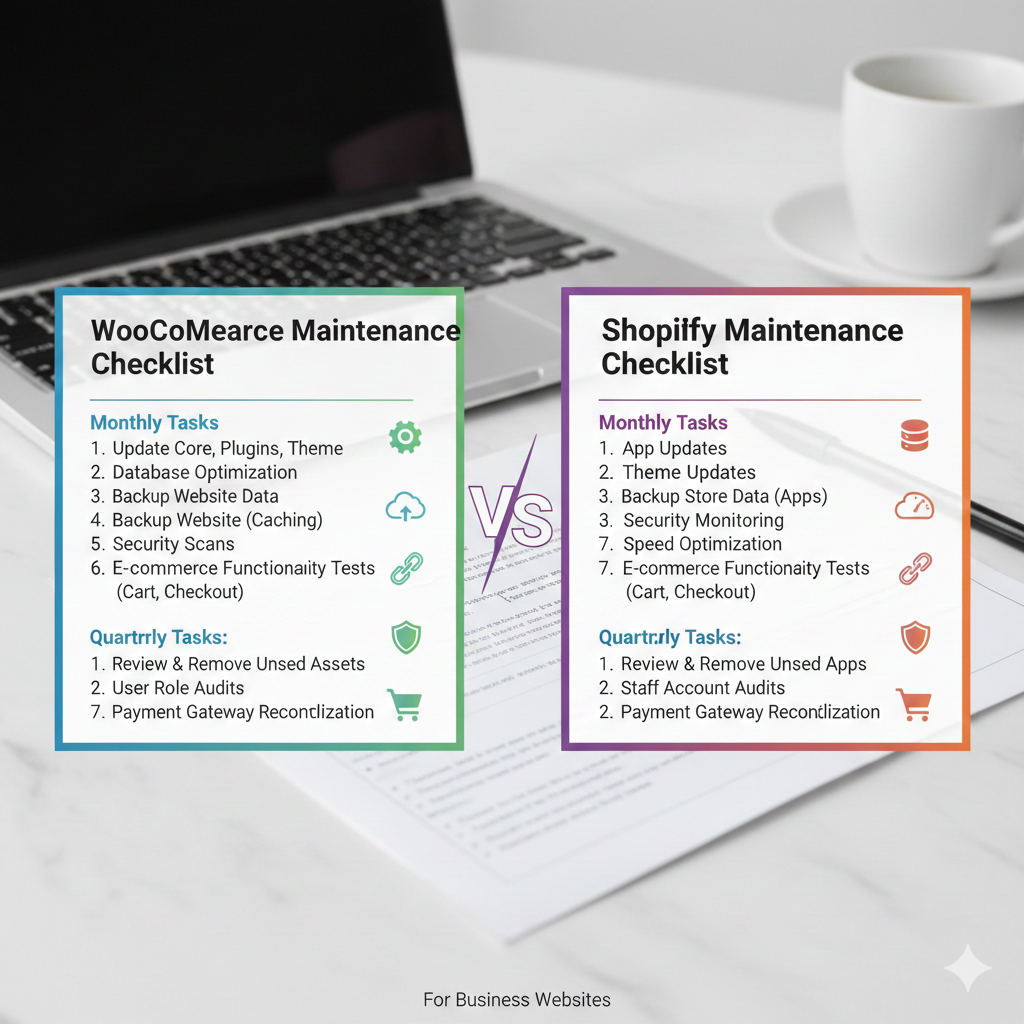
WooCommerce vs Shopify Maintenance Checklist for Business Websites
Once your store is live, maintenance becomes an ongoing responsibility not a one-time task. While both WooCommerce and Shopify help you sell online, the way you maintain each platform is very different.
Below is a detailed, practical maintenance checklist that reflects how business websites actually operate.
WooCommerce Maintenance Checklist:
WooCommerce gives you flexibility, but that flexibility comes with hands-on maintenance. Ignoring even small updates can cause performance issues or security risks.
1. Update WordPress, WooCommerce, and Plugins Regularly
WooCommerce depends on multiple components working together:
- WordPress core
- WooCommerce plugin
- Themes and additional plugins
Each update may affect another part of your site. Before updating:
- Take a full backup
- Check plugin compatibility
- Test updates on a staging site if possible
Skipping updates can lead to broken features, slow checkout pages, or security vulnerabilities.
2. Perform Regular Website Backups
Backups are non-negotiable for WooCommerce sites. A failed update or hacked site can wipe out product data, orders, or customer information.
A proper backup strategy includes:
- Daily automated backups
- Separate storage (cloud or external server)
- Easy one-click restore options
Without backups, even a small issue can turn into costly downtime.
3. Security Monitoring and Protection
WooCommerce sites are common targets because they’re built on WordPress. Security maintenance should include:
- Security plugins and firewalls
- Malware scanning
- Strong admin passwords and limited access
- Regular monitoring of login activity
Security isn’t a one-time setup—it needs consistent attention.
4. Performance Optimisation and Speed Checks
As your store grows, performance can decline due to:
- Too many plugins
- Large product images
- Database clutter
Regular maintenance tasks should include:
- Image optimization
- Cache configuration
- Database cleanup
- Hosting performance review
A slow WooCommerce site directly affects user experience and conversions.
5. Product, Content, and Database Management
Over time, WooCommerce stores collect unused data:
- Old products
- Draft pages
- Expired coupons
- Abandoned carts
Cleaning up this data keeps your site organised, improves load speed, and reduces server strain.
Shopify Maintenance Checklist
Shopify handles much of the technical side, but that doesn’t mean maintenance can be ignored. It’s more about store management and optimization than system upkeep.
1. Review Theme and Design Updates
Shopify themes are updated to improve speed, compatibility, and user experience. You should:
- Check for theme updates
- Test changes before publishing
- Ensure custom code still works properly
Even small design issues can impact trust and sales.
2. App Management and Optimisation
Apps add functionality but too many apps can slow your store or create conflicts.
Maintenance tasks include:
- Removing unused apps
- Reviewing app permissions
- Checking monthly app costs
- Ensuring apps are updated and supported
A lean app setup keeps your store fast and stable.
3. Data Backup and Store Protection
Shopify stores data securely, but it’s still smart to:
- Use backup apps for products and orders
- Protect against accidental deletions
- Monitor staff access and permissions
Backups add an extra safety layer for growing businesses.
4. Performance and Store Speed Monitoring
Shopify stores are generally fast, but performance can drop due to:
- Heavy themes
- Large images
- Third-party scripts
Regular speed checks help ensure smooth browsing and checkout experiences.
5. Product, Inventory, and Content Updates
Shopify maintenance focuses heavily on store accuracy:
- Updating product details
- Managing inventory levels
- Reviewing out-of-stock items
- Keeping content fresh and relevant
These tasks directly impact customer trust and conversion rates.
Common Maintenance Mistakes to Avoid
No matter which platform you use, maintenance problems usually don’t come from big decisions—they come from small tasks being ignored over time. Here are the most common mistakes businesses make with WooCommerce and Shopify maintenance.
1. Treating Maintenance as a One-Time Task
Many store owners assume that once the website is live, the work is done. In reality, e-commerce websites need ongoing attention. Skipping regular maintenance leads to outdated features, broken functionality, and security risks.
Maintenance should be planned monthly, not handled only when something breaks.
2. Ignoring Updates Until Something Goes Wrong
Delaying updates is especially risky for WooCommerce sites. Outdated plugins or themes can:
- Cause checkout errors
- Break site layouts
- Open security vulnerabilities
On Shopify, ignoring theme or app updates can lead to compatibility issues and slower performance.
3. Not Testing Changes Before Going Live
Applying updates directly to a live store without testing is a common mistake. Even a small update can affect payments, product pages, or mobile usability.
Using a staging environment—or at least testing during low-traffic hours—helps prevent revenue loss.
4. Overloading the Website with Apps or Plugins
More features don’t always mean better performance. Too many plugins in WooCommerce or apps in Shopify can:
- Slow down the site
- Create conflicts
- Increase maintenance complexity
Regular reviews help keep only what truly adds value.
5. Overlooking Performance and User Experience
Speed, navigation, and mobile experience are often ignored until customers complain. Slow-loading pages or confusing checkout flows can quietly reduce conversions.
Routine performance checks should be part of your maintenance plan.
Cost and Time Considerations for Maintenance
Maintenance isn’t just about technical tasks—it also affects your time, budget, and long-term scalability. WooCommerce and Shopify differ significantly in how much effort and investment they require to stay healthy.
1. WooCommerce: Time and Cost Commitment
WooCommerce itself is free, but maintenance involves ongoing responsibilities that can add up over time.
- Time investment includes:
- Managing updates and compatibility checks
- Monitoring security and backups
- Optimizing performance
Troubleshooting issues when conflicts occur
Cost factors may include:
- Hosting services
- Premium plugins and themes
- Security and backup tools
- Developer or maintenance service fees
WooCommerce works best for businesses that either have in-house technical support or are comfortable outsourcing regular maintenance.
2. Shopify: Predictable and Managed Costs
Shopify follows a subscription-based model, which simplifies maintenance planning.
Time investment includes:
- Reviewing apps and themes
- Managing products and content
- Monitoring store performance
Cost factors include:
- Monthly Shopify plan
- Paid apps
- Premium themes
Since Shopify handles core updates and security, businesses spend less time on technical maintenance and more on store growth.
3. Which Platform Is Easier to Maintain Long-Term?
Shopify offers simplicity and predictability, making it easier for non-technical teams.
WooCommerce offers control and flexibility, but requires more hands-on maintenance and planning.
The right choice depends on how much time, budget, and technical involvement your business can commit.
Conclusion
Maintaining an online store is an ongoing responsibility, not a one-time task. Whether you choose WooCommerce or Shopify, regular maintenance plays a key role in keeping your website secure, fast, and reliable for customers.
WooCommerce offers flexibility and control, but it requires consistent updates, backups, and performance checks to avoid technical issues. Shopify simplifies much of the technical work, yet it still needs regular attention to themes, apps, and store content to ensure everything runs smoothly.
The right platform depends on your business needs, technical comfort level, and available time. What matters most is having a clear maintenance plan in place and following it consistently.
For businesses that prefer professional support, webyking helps manage WooCommerce and Shopify maintenance with a practical and reliable approach. This allows business owners to focus on growth while their website remains stable and well-maintained.