





Website speed plays a significant role in user experience, SEO, and conversions. If a WordPress website loads slowly, users become frustrated and quit quickly. This causes bounce rates to rise and engagement to decrease. Search engines such as Google also factor page speed into their ranking algorithms. It means that a slow website could negatively impact search engine visibility and traffic.
Innovative Ways to Optimise WordPress in 2026
Here are ten expert-recommended ways to increase WordPress website performance through 2026.
Speed Up Image Files
Large images are among the significant reasons websites load slowly. Optimising images can dramatically increase speed without sacrificing image quality. Convert pictures to modern formats such as WebP and AVIF. Use image compression tools such as ShortPixel, Imagify, or Smush to reduce the size of your images. Enable lazy loading to ensure images only load when they are visible on the screen. This decreases the initial page loading time.
Enable Page-Level Caching
Caching is a method of storing static pages on your site to speed up their loading for visitors. If you do not cache, WordPress generates pages every time a user comes to your site. Use caching plugins such as WP Rocket, W3 Total Cache, LiteSpeed Cache, or WP Fastest Cache to speed up page load times and server response times.
Upgrade Your Hosting Setup
The hosting service you choose directly influences website speed. Shared hosting is often limited in resources, which can slow your website. Upgrading to a more managed hosting option can improve your site's performance. Popular hosting options include Kinsta, WP Engine, Cloudways, and SiteGround. These hosts provide optimised environments for WordPress websites.
Reduce HTTP Requests
Every file you upload to your site generates an HTTP request. More requests mean slower loading. Combining CSS as well as JavaScript files to decrease the number of requests. Use CSS Sprites to combine multiple images into a single file. Eliminating unnecessary files can help pages load more quickly.
Clean and Optimise the Database
A messy database can slow down website performance. Get rid of unwanted data with plugins such as WP-Optimise and WP-Sweep—limit post revisions to reduce database size. Eliminate expired transients and unneeded tables. Proper database indexing can improve query speed and site performance.
Enable Gzip Compression
Gzip compression reduces the size of web pages before they are transferred to the internet browser. This helps websites load faster. It is possible to enable Gzip compression with caching plugins such as WP Rocket and W3 Total Cache. Many hosting providers allow compression through their control panels.
Use a Content Delivery Network
A CDN stores the website's content across servers worldwide. It allows users to access your website from the server closest to them, reducing load time. The most popular CDN service providers are Cloudflare, BunnyCDN, and StackPath. These CDNs are reasonably priced and highly efficient.
Optimise Third-Party Scripts
Many third-party scripts, such as ads, analytics, and social media tools, can slow down your website. Get rid of unnecessary scripts and tracker codes. Asynchronously load scripts or defer them until they don't hinder the rendering of pages. Hosting fonts locally helps to reduce requests from outside.
Choose a Fast and Lightweight WordPress Theme
The theme you choose for your website has a significant impact on speed. Heavy themes with many features and scripts can cause slow loading. Pick a light, straightforward theme with a minimal design. Free WordPress themes such as GeneratePress, Astra, Neve, and Kadence are excellent choices for performance-optimised websites.
Remove Unused Code and Files
The use of unnecessary CSS and JavaScript files can increase load times—Utilise tools such as WP Rocket, Asset CleanUp or Autoptimize to eliminate unnecessary code. Eliminating render-blocking resources helps pages load faster and enhances the user experience.
Conclusion
By implementing these optimisation techniques, your WordPress site will experience faster load times, a better user experience, and better Google search results. A performance-optimised site keeps visitors engaged, reduces bounce rates, and increases conversions. Selecting fast, affordable WordPress themes and ensuring proper optimisation ensures your site remains effective and competitive through 2026.

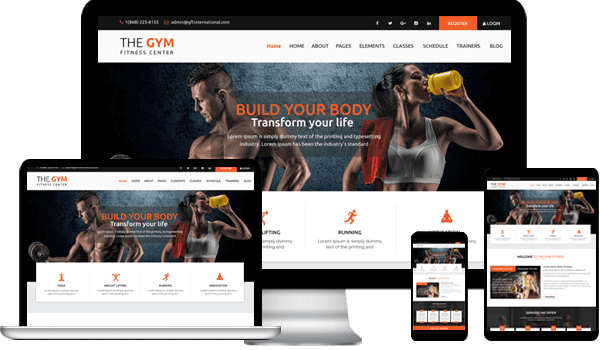
If you've got just started together with your fitness club and need to plug it but don’t have proper knowledge of website building, then this theme is that the best solution to urge started.It's made for gyms, fitness clubs, yoga classes, personal trainers, health clubs and other fitness and health related websites.
It provides layouts for blog and portfolio also.Free WordPress Theme FunctionalityInstall And Configure: You only got to install and configure the theme and do small changes thereto if you would like to, that documentation is as long as makes the work unbelievably easy, and therefore the rest are going to be managed by this free WordPress fitness theme itself without bothering you.Conforms WP Quality Standards: It's coded from scratch and conforms to WordPress standards assuring a bug-free site.Excellent Look: It's fully responsive giving an excellent look on different devices.
All Browser Access And Dialect Translate: It's tested to figure with all the leading browsers and comes with files to translate it into other languages.Receive Good Traffic: The theme is optimized for SEO to receive good traffic.
Reach People: Reach maximum people with help of social media icons for better market of your website.Free WordPress Theme FeaturesThis free WordPress fitness theme comes with features that are essential for a contemporary website.Solid Code QualitySliderChild theme CompatibleSocial SharingAffordable ThemesFully responsiveness and 100% mobile-friendlyLive CustomizerTranslation ReadyWoocommerce compatibilitySEO optimizedHome page templatesBlog layoutSupports 3rd Party PluginsFull Documentation Theme OptionsInspiring Websites With Best Free Fitness WordPress ThemesMotivation is usually the first fuel when it involves wellness and fitness.
Our theme features a lot to supply to make a tremendous website.Suits Design: We've secured the theme with a particularly suitable design for any quite fitness website.
Planning: The planning is extremely well sorted and created employing a Bootstrap framework making everything streamlined and light-weight.

Top 10 Most Customizable WordPress Themes of 2021 to Explore.
There are over thousands of WordPress themes available on the internet in today’s era, so it becomes very difficult for a newbie to decide which theme would be the best fit for them.
When you search for a WordPress theme you get many suggestions and half of your time goes into watching and selecting the best suit for you.Read more here: https://www.themeatlas.com/blogs/top-most-customizable-wordpress-themes