


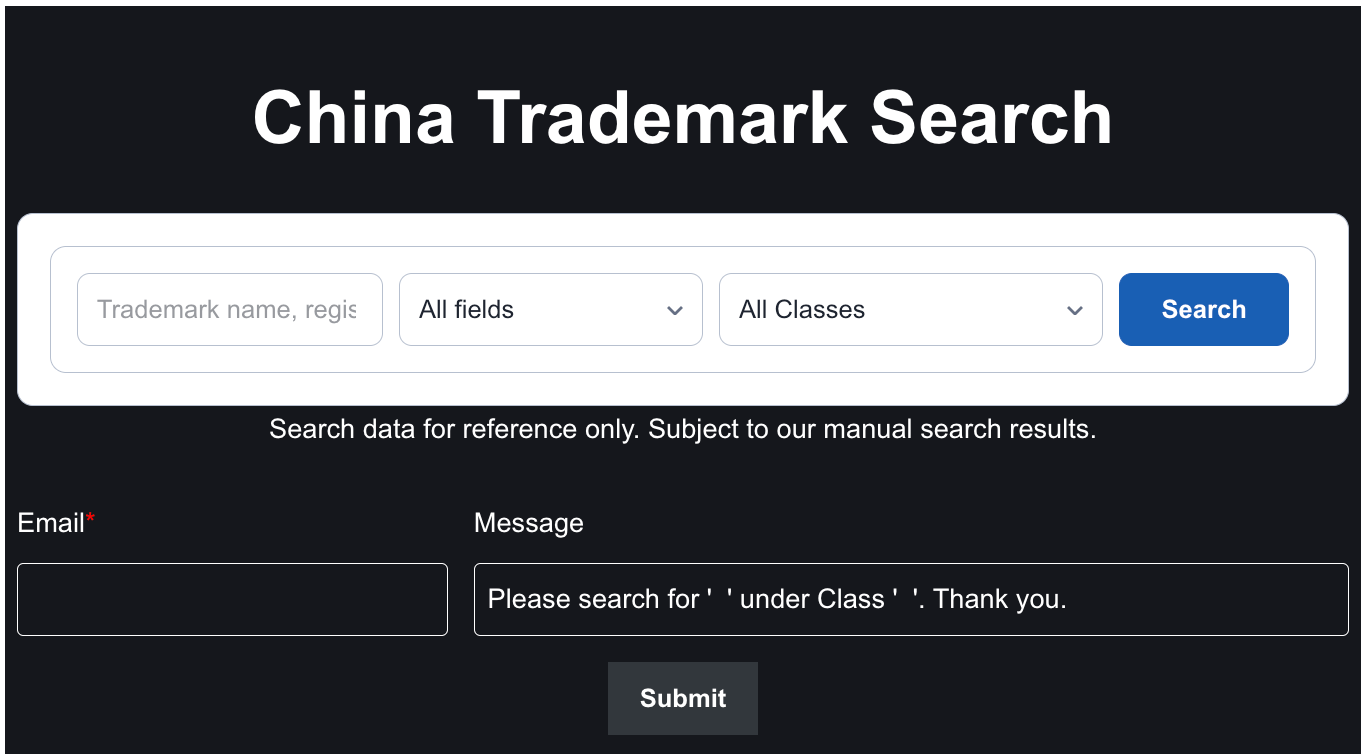
China Trademark Search Tool Link:
https://callmedrake.com/how-to-conduct-a-china-trademark-search/
China Trademark Classification Search
User guide
What to type, how to read the answer, and what this tool cannot tell you. About five minutes.
- Free to use, no account
- Chinese and English
- Works on a phone
The search reads China’s public trademark register. Type a name, a registration number or a company, and it shows you what is already on file — who applied, in which class, whether it is registered, and the goods it covers.
1. Type what you are looking for
Put your search in the box and press Search. That is the whole form. You do not need the exact name — a word from it is usually enough.

The first menu decides which fields are searched:
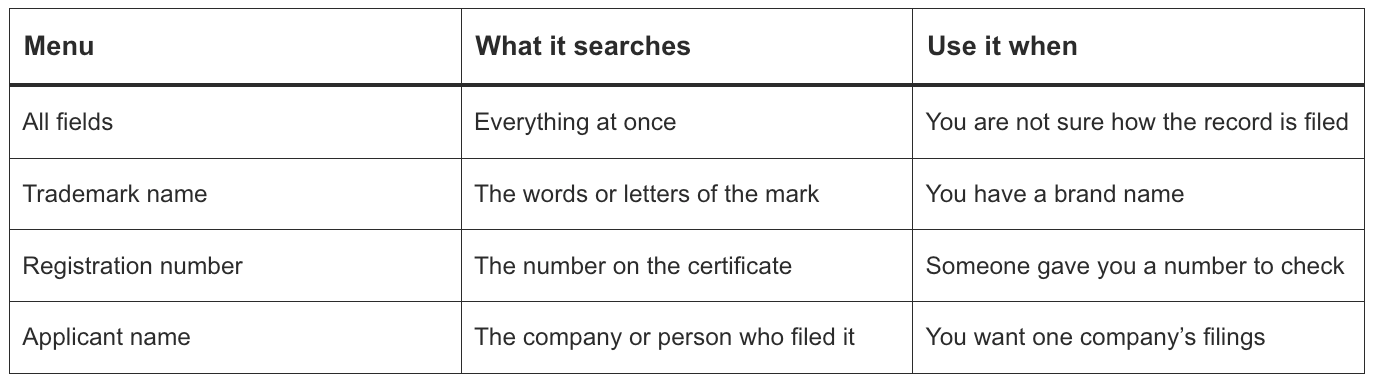
The second menu filters by class. Leave it on All Classes unless you already know the class you care about: the same name can be registered in one class and free in another.
A word from the name is enough. If you are checking a company rather than a mark, choose Applicant name — otherwise the search also picks up records that merely mention the company.
2. Read the list
Every row is one trademark. The line above the table tells you how many records matched.

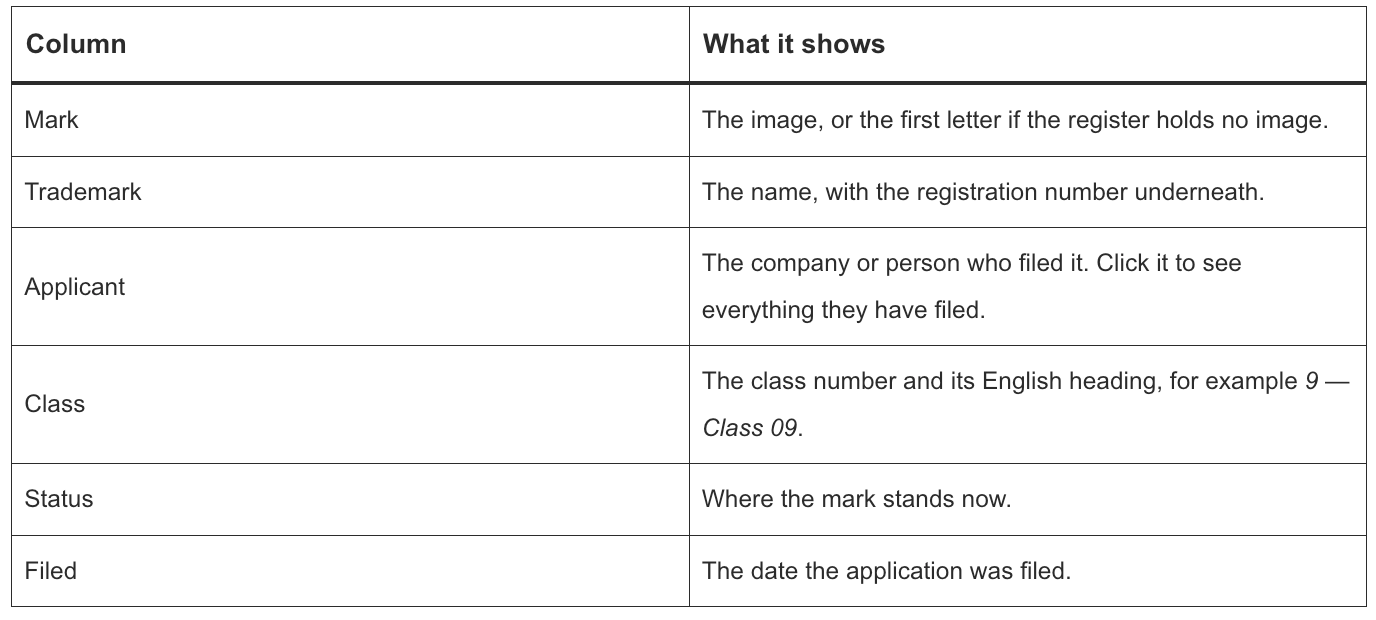
Status is colour-coded so a full page can be read at a glance:
- Green: Registered, renewed, or through preliminary approval
- Brown: Still in progress: examination, publication, opposition
- Red: Refused, cancelled, withdrawn, invalidated or expired
- Gray: The register gave no status
Click the image or the name to open the full record.
3. Open the record
The record opens in a panel over the page, so your results stay where they were. Close it and you are back on the same page of the same search.
 The top of a record: the mark, the name, the class and the registration number, then the fields.
Inside you get the filing and registration dates, the applicant and its English name, the address, the agent, the exclusive-rights period, the publication numbers and dates, claims such as colour or collective mark, the goods list, and the gazette notices.
The applicant row carries a short link, All their trademarks. It is the way into step 6.
4. Read the goods list in English
Each item is shown in Chinese with the English in brackets: 曝光表(照度计)(exposure meters [light meters]).
 Goods and services with the English wording beside the Chinese. Struck-through items were removed from the application.
The English is not a translation. It is the wording of the Nice Classification (NCL 13-2026), the list China and most other countries use to sort goods and services, and it ships with the tool. Where that list has no English for a name, the Chinese is shown on its own — nothing is guessed.
A struck-through item was deleted from the application. It stays on the list so you can see what was removed.
The Chinese is the version that counts. The English is there to help you read it.
5. See the actual publication
Every gazette notice for the record is listed with its issue, date and page. View gazette scan opens the published page as an image.
 A gazette notice, with the button that opens the scan.
6. See everything one company has filed
Click the applicant’s name in a row, or All their trademarks in the record. The list is replaced with that company’s filings, and a bar at the top says whose they are.
 One applicant’s filings. Back to the search results returns you without searching again.
Two things to know about this list:
- It is grouped by the name exactly as the register prints it, and the tool does not send ID numbers to tell companies apart. If two different companies share a name, both appear — the note above the list says so.
- The whole list arrives in one response, so turning its pages is instant and costs nothing extra.
A very large portfolio is cut at 500 rows by default, and the list says so rather than pretending that is all of it.
 When the list is longer than the limit, it says so and offers the full list on request.
7. If you are asked to prove you are a person
From your second search of the day, a short sum appears before the search runs. Answer it and the search carries on where you left it — you are not asked again for half an hour.
 The check appears before a search, and the search carries on after it.
It is there to stop automated scraping, not to identify you.
8. If you reach today’s limit
Searches are free, but each visitor gets a fixed number per day. When you reach it, the panel offers an email address and a contact page instead, and the count starts again at midnight, site time.
 A way to reach us, instead of a dead end.
Opening an applicant’s list counts as a search, because the register charges for it. Turning that list’s pages does not.
9. On a phone
The table becomes one card per trademark. Nothing is hidden and nothing scrolls sideways.
 The same search at phone width.
What this cannot tell you
- Only what is published. Applications that have not been published yet, unregistered rights, and changes that have not reached the register will not appear.
- Not legal advice. A search is a first check, not a clearance opinion. Whether a mark can be used or registered is a separate question.
- Same-name companies share one list. The tool does not send ID numbers, so two different companies with the same name appear together.
- Status is in Chinese on the applicant screen. That screen uses a different register endpoint, which returns the register’s own wording rather than a status code — so the wording is shown as published.
The table below is a reading aid for those Chinese labels, not a translation the tool performs:
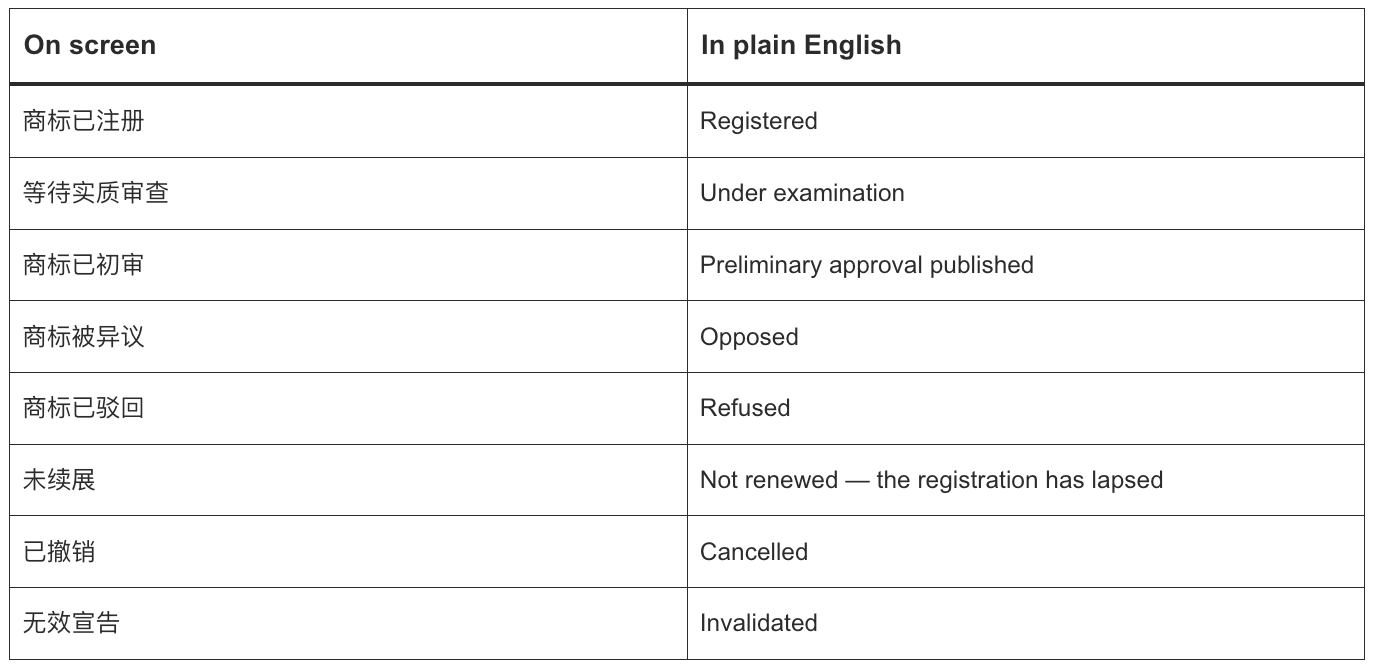
If a label you see is not in this table, the Chinese is still the official wording — treat it as the record and ask us if it matters.
Results come from public register data. They are not legal advice.
However, it’s important to note that even if you see the search results, without professional trademark knowledge and years of experience, you might still be completely confused. Setting aside years of experience in the trademark industry, the book on trademark search judgment alone is a substantial volume.
Please note: Mainland Chinese trademarks are not valid in Taiwan and Hong Kong. To register a Taiwan trademark or Hong Kong trademark, Taiwan trademark search and Hong Kong trademark search are likewise required for both regions.
Hiring a trademark agency to search.
Generally, graphic searches are charged, but text searches are free.
Let’s take an example: If a game development company wants to register a trademark for a game, the first step before the game’s launch is to register the core classes for the trademark: Class 9 for “computer game software,” “downloadable computer application software,” etc.; Class 28 for “game apparatus,” “game machines,” etc.; Class 41 for “providing online games on a computer network,” etc.; Class 42 for “computer software design,” “website services,” etc. After the game product has received a significant market response, you can choose to register related derivative classes, such as Class 16 for “pictures, posters, stationery,” etc.; Class 35 for “advertising,” etc.; Class 38 for “internet chat rooms,” etc. It is best to also apply for copyright registration for the game’s LOGO and game name, which is beneficial for later rights enforcement. Step 2: Check the distinctiveness of the trademark and whether it has any adverse effects. Step 3: Search for prior identical or similar trademarks. Step 4: Analyze and filter the trademark search results. Step 5: Issue a trademark search report.
However, there is a prerequisite for this: only ethical companies will conduct a responsible search. A reputable trademark agency will stand in the client’s shoes and honestly inform the client of the registration success rate for the name. If the success rate is too low, they will advise the client not to register. Unscrupulous agents, on the other hand, hope the client’s registration fails, so they can later charge a rejection review fee several times the market price. The rejection review fee is much higher than the registration fee. The usual practice of unscrupulous agents is to offer registration at zero or extremely low agency fees, not conducting a proper preliminary search for the client or just giving a perfunctory one, and even recommending registration when they know the success rate is low.
One more thing: whether you search yourself or entrust a trademark agency, there will be a one-month blind period, which is unavoidable.
DRAKE CHEN ®
Wuhan Chuchuangyuan Trademark Agency Co., Ltd
Phone: +852 84834225/+86 18672762230
Email: ip@callmedrake.com
Address:
Huaqingyuan, Zhongshan Road 975, Jiangan Dist
Wuhan City, Hubei province, China
Jakarta Office
Contact person: Lucky Ridillah
Email: info@callmedrake.com
Address:
The City Tower, Level 12-1N, Jl. MH Thamrin No. 81 Menteng,
Jakarta 10310, Indonesia
Copyright © 2010-2026 – All Rights Reserved – Wuhan Chuchuangyuan Trademark Agency Co., Ltd
Source article: https://callmedrake.com/how-to-conduct-a-china-trademark-search/



First, what is a combined trademark?
A combined trademark is made up of m

The US Patent and Trademark Office (USPTO) has announced a new Trademark Rule, which requires all applicants, registrants, or parties for Trademark Application whose domicile isn’t located within the US or its territories to be represented https://www.kashishworld.com/blog/new-uspto-trademark-rule-requires-foreign-applicants-to-have-a-us-attorney/