The travel industry has changed dramatically over the last decade. Travelers now expect to search, compare, and book their trips online within minutes. Because of this shift, travel booking platforms have become essential for travel agencies, startups, and businesses entering the tourism space. If you want to build a reliable and scalable travel booking platform, using the Travelport API can be a strong foundation.
This article explains how to build a travel booking platform using the Travelport booking API. It is written to help business owners, product managers, and non-technical readers understand the full process from planning to launch.
What Is a Travel Booking Platform?
A travel booking platform is an online system designed to make trip planning simple and convenient for users. It brings multiple travel services together in one place, allowing travelers to search, compare, and book options without switching between different websites. These services commonly include flights, hotels, car rentals, and, in many cases, complete travel packages that combine two or more of these elements.
Instead of users needing to visit individual airline or hotel websites, the platform works as a single access point. Travelers can enter their trip details such as destination, travel dates, and number of passengers and instantly see available options from multiple providers. This not only saves time but also helps users compare prices, schedules, and amenities more easily.
What is Travelport API :
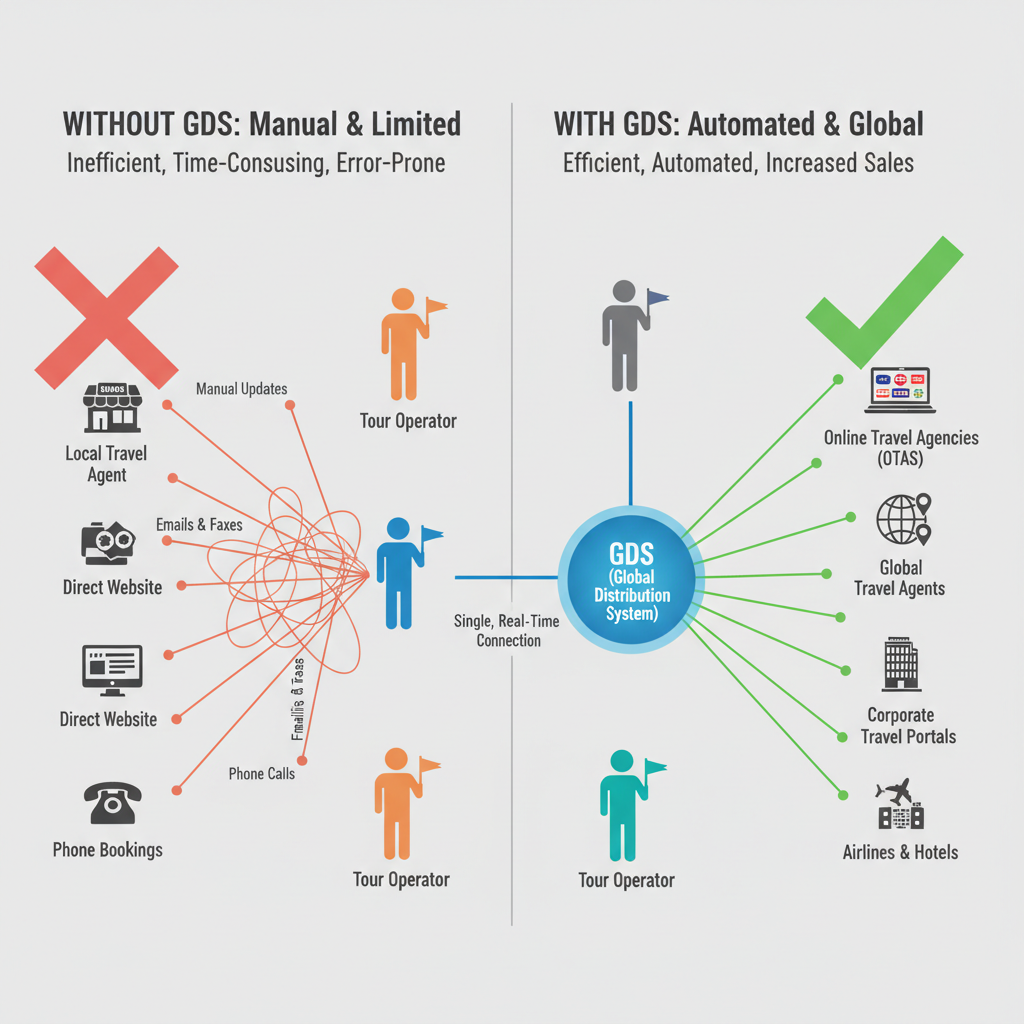
The Travelport API is a software interface that allows travel businesses to access and use global travel data in real time. It connects online travel platforms, travel agencies, and booking systems to a large network of airlines, hotels, and car rental companies through a single connection.
Instead of building separate integrations with each airline or hotel, businesses can use the Travelport API to retrieve travel information from many providers at once. This makes it easier to search for available options, compare prices, and complete bookings within one platform.
The Travelport API provides several core capabilities. It allows platforms to search for flights, hotels, and car rentals based on user input such as travel dates, destinations, and passenger details. It also delivers up-to-date pricing and availability, which helps ensure that users see accurate information before they book.
How to Build a Travel Booking Platform
Building a travel booking platform requires clear planning, reliable travel data, and a user-focused approach. When done correctly, it allows travelers to search, compare, and book their trips easily while helping businesses manage bookings efficiently.
1. Define Your Business Model
The first step is to decide what kind of travel booking platform you want to build. Some platforms focus only on flight bookings, while others include hotels, car rentals, or complete travel packages.
You should also identify your target audience, whether they are leisure travelers, business travelers, or a specific niche. These decisions shape the structure, features, and long-term direction of your platform.
2. Choose a Reliable Travel Data Provider
A travel booking platform needs accurate and real-time data. Instead of connecting with airlines or hotels one by one, most platforms use a global travel content provider.
The Travelport API is one such solution. Travelport API integration allows your platform to access a wide range of airlines, hotels, and car rental companies through a single connection, removing the need for multiple supplier integrations. This unified approach makes it easier to manage travel content, maintain consistent data, and scale your platform efficiently as your business grows.
3. Plan the Core Features
Every successful travel booking platform includes a few essential features that users expect.
Key features to plan:
Travel search based on dates, destinations, and passengers
Search results with clear pricing and options
Booking and reservation management
Secure payment processing
Booking confirmation and email notifications
These features form the foundation of your platform.
4. Design a Simple and Clear User Experience
User experience plays a major role in the success of a travel booking platform.
Focus on:
Clean layouts with minimal distractions
Easy-to-read search results
Simple booking steps
Clear pricing and policies
Search results should be easy to compare, pricing should be clearly displayed, and booking steps should be straightforward. A simple and well-structured interface increases user trust and reduces abandoned bookings.
5. Integrate the Travel Booking API
Once your platform design and features are planned, the next step is integration. This is where your system connects to live travel data through the API. When a user searches for travel options, your platform sends a request to the API and receives real-time availability and pricing.
When the user confirms a booking, the API processes the reservation and returns a booking reference. This connection allows your platform to operate as a real-time booking system.
6. Set Up Secure Payment Processing
Payments are a critical part of the booking experience. Your platform should work with a trusted payment provider to ensure secure transactions.
The final price should be shown clearly before payment, and users should receive instant confirmation once the payment is successful. A secure and transparent payment process builds confidence and encourages repeat bookings.
7. Test the Platform Thoroughly
Before launching your travel booking platform, thorough testing is essential. You should test search functionality, booking flows, and payment processing to ensure everything works correctly.
It is also important to test error scenarios, such as failed payments or unavailable inventory, to make sure the platform handles them smoothly. Proper testing helps prevent user frustration and operational issues after launch.
8. Launch and Monitor Performance
After testing is complete, you can launch your platform. During the early stages, closely monitor user behavior, booking success rates, and system performance. User feedback during this phase is valuable and can help identify areas for improvement. Quick adjustments at this stage can significantly improve the overall experience.
9. Maintain and Improve the Platform
A travel booking platform requires ongoing improvement. Travel data changes often, and user expectations continue to grow.
Over time, you can:
Add new travel services
Improve mobile usability
Introduce loyalty or discount programs
Optimize performance and speed
Regular updates help your platform stay competitive.
What is Travel Booking APIs & How They Work Together
A travel booking platform depends on several types of APIs that work together to deliver real-time search results, accurate pricing, secure bookings, and post-booking management. Each API has a clear role in the booking journey. Below is a simple and practical explanation of the main API types used in a travel booking platform and how each one works.
Travel Search APIs:
Travel search APIs are used when a user starts looking for travel options. When a traveler enters details such as destination, travel dates, and number of passengers, the platform sends this information to the search API. The API then checks multiple travel suppliers and returns available flights, hotels, or car rentals. The platform displays these results so users can compare options easily.
Pricing and Fare Validation APIs:
Once a user selects a travel option, pricing APIs are used to confirm the final cost. Travel prices change frequently, so this API verifies that the selected option is still available at the shown price. It also provides fare rules, such as cancellation or change policies. This step ensures pricing accuracy before the user proceeds to booking.
Booking and Reservation APIs:
Booking APIs are responsible for creating reservations. After the user enters traveler details, the platform sends this information to the booking API. The API reserves the selected travel service and returns a booking reference. This reference confirms that the travel inventory is held for the user.
Ticketing APIs:
Ticketing APIs are mainly used for flight bookings. After payment is completed, the platform calls the ticketing API to issue the travel ticket. This step converts a reservation into a confirmed booking. Ticketing APIs also support ticket changes or reissues when needed.
Ancillary Services APIs:
Ancillary APIs allow users to add extra services to their booking. These services may include seat selection, additional baggage, meals, or priority boarding. The platform calls these APIs to retrieve available add-ons and updates the booking once the user makes a selection.
Booking Management APIs:
Booking management APIs handle actions after a booking is completed. They allow users or support teams to view booking details, make changes, or cancel reservations. When a change is requested, the API checks availability and fare rules before applying updates.
Payment Gateway APIs:
Payment gateway APIs process financial transactions. When a user proceeds to pay, the platform sends payment details to the payment API. The API confirms whether the transaction is successful or failed. Once payment is confirmed, the platform continues with ticketing or final booking confirmation.
Notification and Communication APIs:
Notification APIs are used to send booking confirmations, receipts, and travel updates to users. These APIs deliver emails or messages using booking data returned by the reservation and ticketing APIs.
How These APIs Work Together
In a travel booking platform, APIs work together in a connected flow that follows the user’s journey. The process begins with search APIs, which retrieve available flights, hotels, or car rentals based on the user’s input. These APIs collect real-time data from multiple travel providers and return options with schedules, availability, and estimated prices. The platform then organizes this information so users can easily compare and select the option that best fits their needs.
Once a user makes a selection, pricing and booking APIs come into action. Pricing APIs confirm the final cost and validate fare rules to ensure accuracy before proceeding. Booking APIs then create a reservation by submitting traveler details and selected options to the travel provider, generating a booking reference that is used throughout the process. At this stage,
The Platform ensures:
Accurate pricing with taxes and fees included
Clear fare rules and conditions
A confirmed reservation reference
After the reservation is created, payment and ticketing APIs finalize the booking. Payment APIs securely process the transaction, while ticketing or confirmation APIs issue tickets or confirm reservations. Notification and management APIs then support communication and post-booking actions, allowing users to stay informed and manage their trips.
These APIs handle:
Secure payment processing
Ticket issuance or booking confirmation
Confirmation emails and travel updates
Booking changes or cancellations
Maintaining and Improving the Platform
Launching your platform is only the beginning. Ongoing maintenance is essential to keep it competitive.
Regular Updates
Travelport updates its systems and services regularly. Stay informed and update your platform when needed to avoid disruptions.
Listening to User Feedback
User feedback provides valuable insights. Use it to improve features, fix issues, and enhance the overall experience.
Scaling Your Platform
As your business grows, you may want to add:
Mobile apps
Loyalty programs
Additional travel services
The Travelport API supports scalability, making it easier to expand over time.
Final Thoughts
All Travelport APIs work together as a connected workflow. Each API handles a specific step, but they rely on each other to deliver a smooth and reliable booking experience. When used correctly, this integrated approach allows travel platforms to provide accurate search results, secure bookings, and efficient post-booking management for travelers.
Focus on clarity, trust, and continuous improvement. By doing so, your travel booking platform can become a valuable solution for users and a strong asset for your business.