

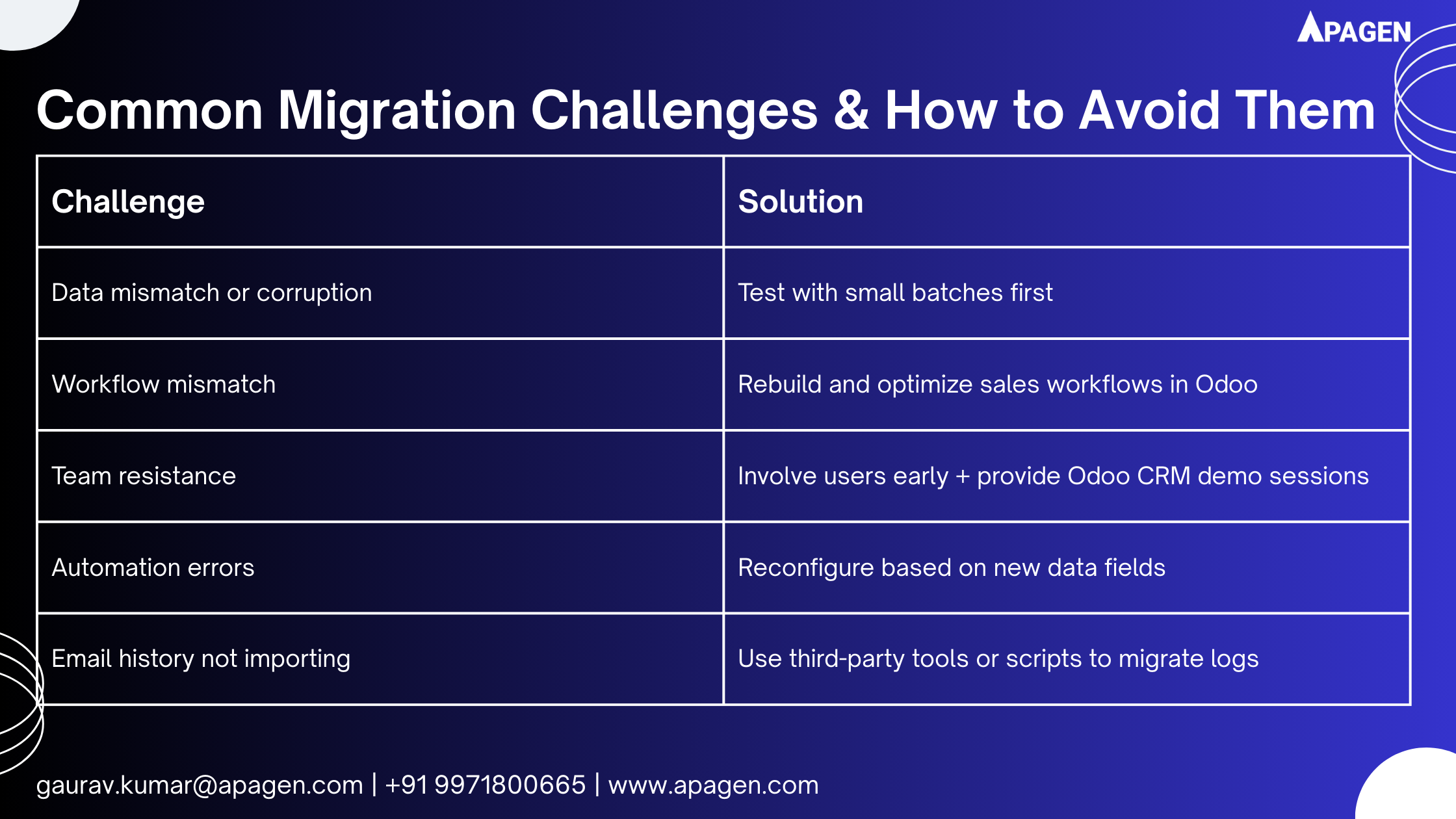
Migrating from a legacy CRM system to a modern, flexible platform like Odoo CRM is not just a technical shift — it’s a strategic move that can redefine how your business handles sales, leads, and customer relationships.
Legacy CRM systems often have limitations, such as outdated interfaces, poor integration capabilities, or expensive maintenance. In contrast, Odoo CRM offers a powerful, open-source, and modular system that adapts to your workflow, grows with your business, and provides insightful reporting and automation features.
This guide will walk you through everything you need to know to migrate smoothly, from planning and preparation to data mapping and final deployment. Whether you’re coming from Salesforce, Zoho, HubSpot, or an in-house legacy CRM, this guide is for you.
1. Why Migrate to Odoo CRM?
Let’s first explore why companies across industries are choosing Odoo CRM:
- Cost-Effective: Lower total cost of ownership than many SaaS CRMs.
- Fully Integrated: Seamless integration with other Odoo modules (Sales, Invoicing, Helpdesk).
- Customizable: Tailor workflows, fields, and dashboards without heavy coding.
- Automation: From lead assignment to follow-ups, automate repetitive tasks.
- Unified Platform: One system for CRM, ERP, marketing, and support.
Before you dive in, it’s best to schedule an Odoo CRM demo to explore features aligned with your business needs.
2. Planning Your Migration: Key Considerations
A successful CRM migration starts with the right strategy. Here’s what to plan for:
a) Define Clear Objectives
Ask questions like:
- What business problems should the new CRM solve?
- What features are missing in your current system?
- What departments will use Odoo CRM?
b) Identify Stakeholders
Include:
- Sales and marketing teams
- IT team (for data migration)
- CRM admin/project manager
c) Take an Odoo CRM Demo
Book a personalized Odoo CRM demo to understand:
- Core CRM functionalities
- Integration capabilities with your current tools
- How leads, deals, and contacts will be managed
3. Data Audit & Cleansing
Migrating to Odoo is the best time to clean up your data. A messy migration = a messy CRM.
a) Export Your Current Data
Export modules such as:
- Contacts
- Companies
- Leads/Opportunities
- Tasks & Notes
- Emails & Attachments (if needed)
b) Remove Junk
- Eliminate duplicates
- Delete inactive or obsolete contacts
- Merge redundant records
c) Standardize Formats
- Phone numbers
- Email syntax
- Lead source tags
- Dates (e.g., use consistent formats like YYYY-MM-DD)
Clean data = clean migration.
4. Data Mapping and Field Matching
Your legacy CRM may have different terminology and data structure than Odoo.
a) Compare Fields
Example:
- “Lead Owner” in Zoho → “Assigned To” in Odoo
- “Pipeline Stage” in Salesforce → “Stage” in Odoo CRM
b) Create Custom Fields in Odoo (if needed)
Odoo CRM allows easy customization. Add custom fields to replicate critical data from your old system.
c) Use CSV Mapping Tools
During data import, Odoo lets you map CSV fields to CRM fields. Take advantage of this to ensure accurate placement of data.
5. Choosing the Right Migration Approach
There are typically three methods:
a) Manual Migration (Good for Small Databases)
Best for small businesses with minimal data.
- Use Odoo’s built-in CSV import tool
- Validate sample data before full import
b) Assisted Migration with Scripts
Suitable for mid-sized databases with custom fields.
- Write Python scripts (or use tools like Talend)
- Validate and map fields programmatically
c) Partner-Led Migration
Best for complex, high-volume, or mission-critical migrations.
- Work with an Odoo partner (like your team at Apagen or ZOHOSYS)
- Leverage their experience for data safety and configuration
6. Migration Steps: From Legacy to Odoo CRM
Here’s a typical step-by-step flow:
Step 1: Backup Everything
Keep backups of your legacy CRM data in case anything goes wrong.
Step 2: Set Up Your Odoo CRM Instance
- Install Odoo (on-premise or cloud)
- Set up sales teams, pipelines, stages
- Customize fields and forms based on business logic
Step 3: Run a Trial Migration
- Import a sample dataset
- Verify accuracy and formatting
- Test workflows, automation, and filters
Step 4: Validate with Stakeholders
Let key users test the system:
- Can they find leads?
- Are all notes and tags intact?
- Does automation trigger correctly?
Step 5: Migrate the Full Dataset
Once the test passes, move ahead with complete data migration.
Step 6: Go Live
- Set a go-live date
- Freeze legacy CRM data entry 24–48 hours before cutover
- Go live with Odoo CRM
- Monitor for issues in the first few days
7. Post-Migration Checklist
Here’s what to check once migration is done:
✅ All leads and opportunities are migrated
✅ Contacts and company details are accurate
✅ Pipelines and sales stages are functional
✅ Automation and email templates are working
✅ Reports and dashboards are showing real-time data
✅ CRM users are trained and onboarded
8. Training Your Team
Migration is just one part of the journey. The next step? Adoption.
a) Role-Based Training
- Sales Reps → Lead capture, follow-ups, pipelines
- Managers → Reports, team performance, KPIs
b) Provide Learning Resources
- Internal documentation
- Live training sessions
- Access to Odoo CRM demo environments
9. Continuous Optimization After Go-Live
Post-migration, keep improving:
- Add filters and dashboards
- Tweak pipeline stages