

Hospitals generate vast amounts of information every day, from patient records and diagnostic reports to pharmacy transactions, billing details, and staff schedules. However, when these records remain scattered across disconnected systems, accessing accurate information becomes difficult. The result can be duplicated work, delayed decisions, and inefficient coordination between departments.
A hospital ERP system helps address these challenges by connecting clinical and administrative functions through centralized data and integrated workflows. Instead of treating every department as a separate unit, hospitals can create a more coordinated operational environment where authorized teams access the information they need.
What Are Hospital Data Silos, and Why Do They Matter?
Hospital data silos occur when departments store and manage information in separate applications that do not communicate effectively. A hospital may use one system for patient registration, another for laboratory reports, a separate platform for pharmacy inventory, and independent software for billing and accounting.
Although these applications may serve individual purposes, limited connectivity creates problems across the patient journey.
For example, a physician may request a diagnostic test, but the relevant department might not receive the required information promptly. Similarly, administrative staff may need to verify service details manually before generating an invoice. These gaps increase the time spent searching for information rather than completing essential tasks.
Disconnected systems can also make hospital-wide reporting difficult. Managers may have to combine spreadsheets and department-level reports to understand resource utilization, expenses, and service performance. Addressing these issues requires better hospital information system integration and implementation planning.
How a Hospital ERP System Connects Clinical and Administrative Data
An integrated platform creates a shared operational foundation by connecting relevant information across departments. A hospital ERP system can support several important workflows, depending on its configuration and integration with existing applications.
1. Connecting Patient Records and Clinical Workflows
Clinical teams need timely access to accurate patient information to coordinate consultations, admissions, diagnostic services, prescriptions, and discharge procedures.
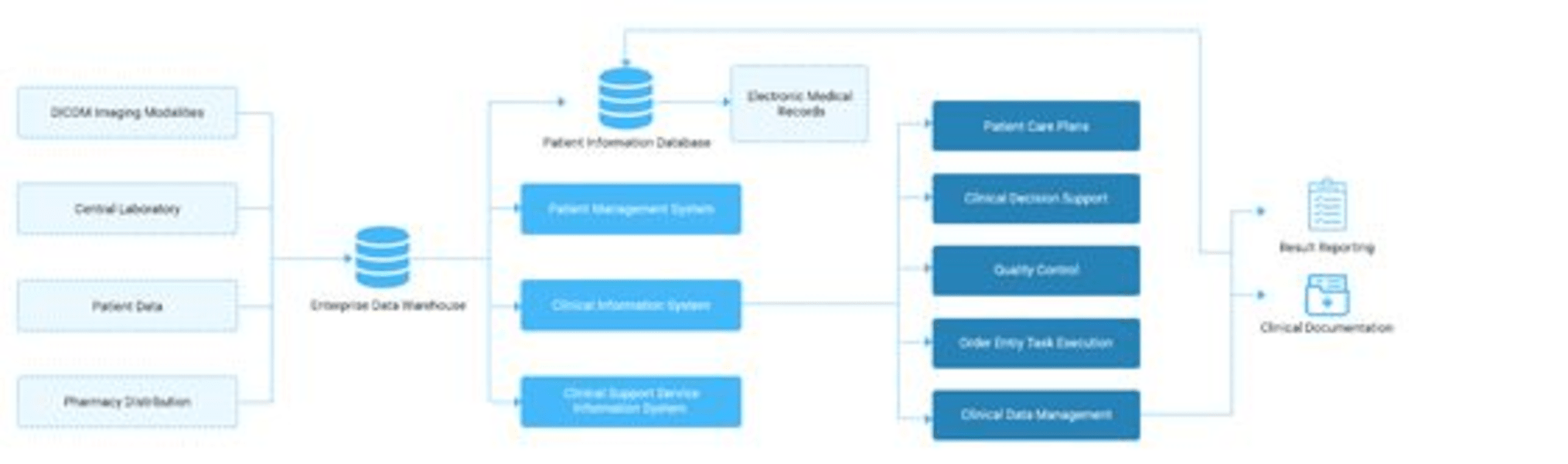
Integrated systems can reduce repeated data entry by making relevant registration details and workflow updates available to authorized departments. When a diagnostic request is recorded, connected workflows can help the laboratory receive the request and associate results with the appropriate patient record.
This approach supports better clinical data management while reducing administrative friction. Hospitals planning this approach can also explore how healthcare ERP workflows connect patient information with administrative and operational activities.
Existing electronic health record and laboratory systems can also be integrated where required, subject to compatibility and appropriate access controls.
2. Linking Clinical Services With Billing and Finance
Clinical activity and financial operations are closely connected. Consultations, diagnostic tests, procedures, and pharmacy transactions may all contribute to a patient's bill.
When these activities are recorded in disconnected applications, staff may need to reconcile information manually, increasing the possibility of missing charges or inconsistent records.
An integrated ERP can connect service records with billing and financial workflows. Authorized administrative teams can verify relevant transactions more efficiently, while finance managers gain better visibility into outstanding payments, revenue, and expenses.
How Integrated Data Improves Hospital Operational Efficiency
Centralized information can create practical improvements beyond simply reducing the number of applications employees use.
Reduced duplicate work: Shared records can limit repeated data entry and reduce inconsistencies across departments.
Faster coordination: Relevant updates can reach the teams responsible for the next step in a patient or administrative workflow.
Better resource visibility: Connected inventory, staffing, and financial information helps managers understand operational requirements.
More informed decisions: Consolidated reports provide a clearer view of departmental activity, resource utilization, and financial performance.
Improved accountability: Role-based permissions, audit trails, and defined workflows can help hospitals monitor access and understand how records change.
These benefits depend on accurate data, appropriate configuration, staff adoption, and reliable integrations. Technology alone cannot eliminate every operational bottleneck, but it can provide a stronger foundation for improving healthcare operational efficiency.
3. Integrating Pharmacy, Inventory, and Procurement
Medicine and medical-supply availability directly affects hospital operations. However, separate pharmacy, inventory, and purchasing systems can make it difficult to maintain an accurate view of stock levels and replenishment requirements.
With connected inventory workflows, medicine dispensing and stock movements can update relevant records. Procurement teams can use this information to identify replenishment needs, monitor expiry dates, and coordinate purchasing decisions.
The result is improved coordination between clinical requirements and administrative planning, helping hospitals manage resources more effectively.
What Should Hospitals Consider When Integrating Their Data?
Breaking down data silos requires more than installing new software. Hospitals should begin by mapping existing workflows and identifying where information gets delayed, duplicated, or lost between departments.
Next, they should assess data quality before migrating records. Duplicate patient profiles, inconsistent item codes, and incomplete financial entries can undermine the reliability of a centralized system.
Integration requirements also deserve careful attention. Hospitals may need to connect existing electronic health records, laboratory information systems, diagnostic platforms, and other specialized applications rather than replace every tool at once.
Security must remain a priority throughout implementation. Role-based access, appropriate authentication, encryption, audit logs, backups, and applicable privacy requirements should be considered when designing the system.
Finally, involving clinicians, administrators, and IT teams in testing and training helps ensure that the new workflows reflect real operational needs. Reviewing a hospital ERP implementation case study can also help decision-makers understand practical implementation considerations.
Moving Toward a More Connected Hospital
Hospital data silos are not simply an IT problem; they affect coordination, administrative workload, and the availability of reliable operational information. Connecting clinical records with billing, inventory, procurement, and reporting can help hospitals reduce fragmented processes and improve efficiency.
An integrated ERP for healthcare provides a practical foundation for bringing these workflows together while allowing hospitals to retain specialized systems where necessary. The goal is to make relevant information available to the right people at the right time, with suitable safeguards.
Hospitals looking to improve coordination should evaluate their current data gaps, integration requirements, and long-term operational priorities before selecting a solution. A well-planned implementation can help create a more connected, accountable, and efficient healthcare environment.
Frequently Asked Questions (FAQs)
1. What is a hospital ERP system?
A hospital ERP system is an integrated platform that connects administrative and operational functions such as billing, finance, inventory, procurement, and staff management. It helps hospitals centralize information, coordinate workflows, and improve operational visibility.
2. How does hospital data integration improve operational efficiency?
Hospital data integration connects information across departments, reducing duplicate data entry, manual reconciliation, and communication delays. It helps clinical and administrative teams access relevant information more efficiently and supports better resource planning.
3. How does an integrated ERP support clinical data management?
An integrated ERP can connect relevant patient-related workflows with billing, pharmacy, inventory, and administrative records. When integrated with electronic health records and other clinical applications, it helps authorized teams coordinate activities while maintaining appropriate access controls.
4. What are the common challenges caused by hospital data silos?
Hospital data silos can lead to duplicated records, delayed information sharing, inconsistent reports, billing discrepancies, and limited visibility into resources. These issues can increase administrative workload and make coordination between departments more difficult.
5. Can a hospital ERP system integrate with existing hospital software?
Yes. Depending on compatibility, available interfaces, and implementation requirements, a hospital ERP system can integrate with existing electronic health records, laboratory information systems, pharmacy applications, and other specialized platforms. Hospitals should assess data quality, security, and integration requirements before implementation.
6. How can hospitals choose the right integrated ERP solution?
Hospitals should evaluate workflow requirements, integration capabilities, reporting features, data security, scalability, and implementation support. Involving clinical, administrative, and IT teams in the evaluation helps ensure the solution addresses actual operational challenges.