





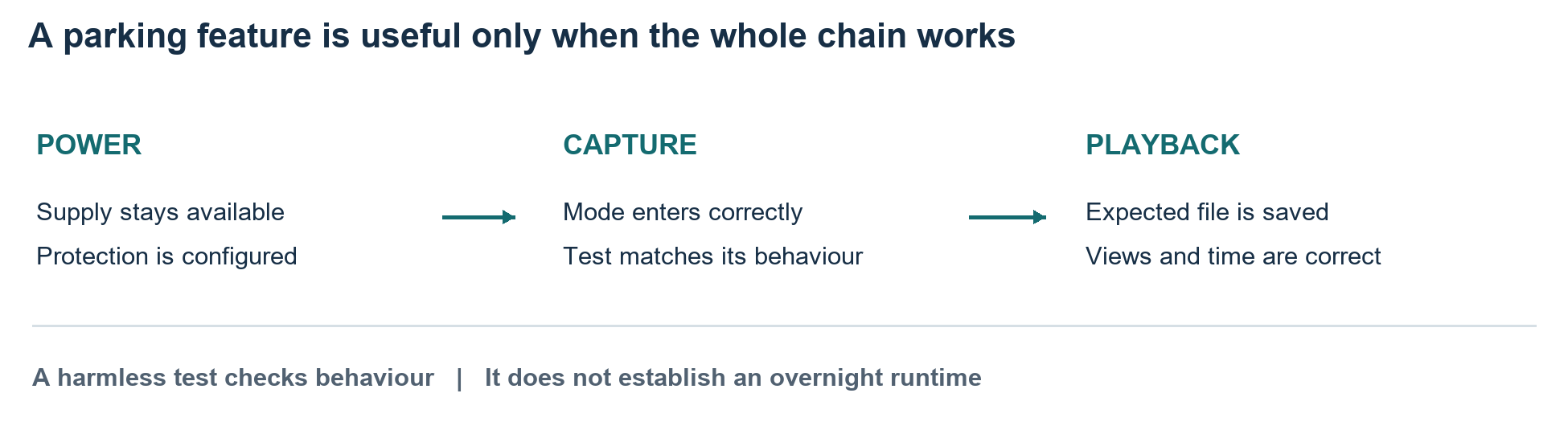
Seeing a parking mode option in a dash cam menu does not prove that it will record a useful event after the engine stops. The camera needs an appropriate power supply, the intended recording mode and a working route from detection to a saved file. Check that sequence before relying on it during an overnight stay.
The most useful first test is controlled and brief. Establish what your exact camera does when parked, then examine the resulting footage. Extend expectations only as far as the power arrangement and documented settings support.
Identify What the Selected Mode Actually Records
Parking modes vary. Some record continuously at a reduced bitrate, some create time-lapse footage and others save clips in response to motion or an impact signal. A buffered event mode may retain footage from before a trigger; a mode that wakes after a trigger may not capture the approach.
BlackVue's model-specific manuals illustrate these differences. Settings described for one camera family should not be transferred automatically to another. Read the manual for the installed model and firmware, including whether the selected mode changes sound recording, event detection or which cameras remain active.
Write down the behaviour you actually need. Recording a vehicle approaching from the side is different from recording movement directly ahead. A front-facing camera cannot be assumed to cover every direction, and an event trigger does not guarantee that the relevant registration plate will be readable.
Verify Power After the Vehicle Has Settled
Confirm whether the installed socket continues supplying power after the vehicle is switched off and locked. Some supplies shut down immediately; others remain active for a period. An indicator light observed just after parking does not establish overnight operation. Consult the vehicle documentation rather than assuming how its sockets behave.
A compatible hardwire arrangement or dedicated dash cam battery may support parking recording. The correct choice depends on the camera, vehicle and manufacturer's instructions. Have vehicle wiring assessed by a suitable installer; guessing at fuse positions or bypassing protection is not a useful parking mode test.
Separate power availability from battery protection. A low-voltage cutoff or timer can stop the camera under specified conditions, but it cannot guarantee the vehicle will start in every circumstance. Battery condition, temperature, other electrical loads and the time since the last charge still matter.
Treat Battery Voltage as Context
A vehicle's resting voltage, cranking voltage and voltage with its charging system operating describe different conditions. Comparing them as though they were the same reading can lead to an incorrect conclusion. The car battery voltage guidance provides background for recognising those contexts before discussing parking power with an installer.
Avoid turning a single reading into a battery health diagnosis. A camera's cutoff setting is a control threshold, not a complete assessment of remaining starting capability. If the battery is weak or the vehicle already struggles to start, resolve that problem before adding prolonged parked recording.
When using automotive information sites such as Rariroscar, distinguish general explanations from the camera manual and vehicle-specific installation advice. A useful discussion brings all three together: how the supply behaves, what protection is installed and what the camera consumes in the selected mode.
Run a Harmless Capture Test and Play It Back
Choose a safe place where you can test without obstructing traffic or disturbing others. Confirm the date, time and camera views. Follow the manual's sequence for entering parking mode, and allow any documented transition period before beginning. Note the test time so the right file is easy to locate.
If the selected mode supports motion detection, walk through the intended field of view and then inspect the clip. For time-lapse or continuous parking recording, check that the corresponding file contains the expected period. Do not strike, shake or damage the vehicle to imitate an impact. Use a manufacturer-approved test procedure where available.
Playback is the decisive step. Open the saved footage, check each enabled camera and confirm whether the scene before and after the test is present. For an event mode, distinguish the trigger time from the start of the saved clip. A notification alone does not establish that a complete, usable file exists.
Check Retention and Recovery Before a Longer Stay
Confirm that the memory card meets the camera's requirements and that recordings can be found and exported. Check how normal and protected event files are overwritten; storage is finite in either case.
Save important footage before maintenance or settings changes that may erase it. Follow the manual's card-care requirements. Verify cloud and local recording separately, because remote access can depend on connectivity, subscriptions or additional hardware.
Review a normal parking period after the initial test, noting whether the camera stayed active and why it stopped. Recheck after relevant equipment or configuration changes. Establish runtime from the actual protected system rather than promising overnight coverage from its feature list.
Conclusion
Check parking mode from power supply to playable file. Confirm the recording behaviour, protected power arrangement and result of a harmless test. This establishes a practical basis for expectations when the car is unattended.
FAQ
Does parking mode record everything around the car?
No. Coverage depends on camera positions, fields of view, detection settings and recording mode. Check the actual views and saved footage rather than assuming complete coverage from the feature name.
Will an ordinary vehicle socket support overnight recording?
It depends on how that vehicle supplies the socket and on the camera's requirements. Verify behaviour after shutdown and use a compatible protected arrangement where parking recording requires one.
Does every event clip include footage before the trigger?
No. Pre-event recording depends on the model and selected mode. A wake-on-event design may begin recording only after detection; confirm the documented behaviour and inspect a test file.
Does a voltage cutoff guarantee the engine will start?
No. It is a protective control with limits. Starting also depends on battery condition, temperature and other demands. Investigate a weak battery rather than relying on the camera setting to compensate.


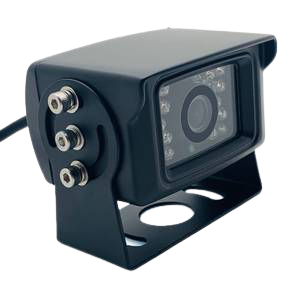
Fleet camera systems have become a vital component of many businesses as a way of managing and monitoring their fleet of vehicles.
Businesses have discovered that using a fleet management software solution has greatly reduced insurance premiums by identifying the most risky drivers.
A professional fleet management software system has the ability to generate reports on vehicle speeds, fuel consumption, fuel mileage, vehicle maintenance, driver records, and much more, all of which can greatly assist fleet managers in making informed decisions about vehicle usage.
With so much riding on good management, fleet managers are always on the lookout for ways to improve their fleet's efficiency and productivity.In addition to tracking vehicle speeds and miles logged on the fleet card, some fleet camera systems have the ability to trigger a number of special events.
This includes collecting information on past events, such as accidents, reckless driving, completion of required tasks, completion of work requirements, etc.
These data sets can then be integrated with each company's fleet camera systems to determine the cause of excessive speeding, excessive stop time, or non-conformities with work requirements.A second goal of developing dash cams with fleet camera systems is to reduce driver error by improving line operations.

April 12, 2019: Car Dash Cameras Report by Material, Application, and Geography - Global Forecast to 2022 is a professional and in-depth research report on the world's major regional market conditions, focusing on the main regions (North America, Europe and Asia-Pacific) and the main countries (United States, Germany, united Kingdom, Japan, South Korea and China).The report firstly introduced the Car Dash Cameras basics: definitions, classifications, applications and market overview; product specifications; manufacturing processes; cost structures, raw materials and so on.
Then it analyzed the world's main region market conditions, including the product price, profit, capacity, production, supply, demand and market growth rate and forecast etc.
In the end, the report introduced new project SWOT analysis, investment feasibility analysis, and investment return analysis.Download sample Copy of This Report at: https://www.radiantinsights.com/research/global-car-dash-cameras-market-research-report-2018/request-sample The report includes six parts, dealing with:1.)
Asia Car Dash Cameras Market;3.)
European Car Dash Cameras Market;5.)
Market Entry and Investment Feasibility;6.)